
UiPath vs Lleverage for ERP operations: how scripted RPA bots that break on change differ from AI-native automation that reads documents and adapts, for SMEs.
Anyone who has run robotic process automation against an ERP knows the failure mode. A bot clicks through invoice entry perfectly for months. Then a supplier sends a new layout, or an upgrade moves a field, and the bot quietly breaks. The exceptions pile back onto the team it was meant to free. This is the heart of the UiPath vs Lleverage question. It is not which product has more features. It is whether ERP operations should run on scripted bots that follow fixed steps, or on AI-native automation that reads context and adapts.
UiPath is the established leader in enterprise robotic process automation. Lleverage is an AI-native layer built for the ERP operations of small and medium enterprises. They solve the same problems with fundamentally different engines. The difference matters most in the messy, document-heavy work of finance and operations. This comparison explains how each approaches ERP automation, where each fits, and why the architecture underneath shapes the maintenance you live with afterwards.
At Lleverage, we build AI agents that read your invoices, orders, and documents and post them straight into your ERP, adapting to new formats without a script to rebuild. If you want to see that on your own ERP processes rather than a generic demo, our invoice processing automation page shows how it works, and you can book a demo to test it against a real process.
What is the difference between RPA and AI-native automation?
Robotic process automation runs scripted bots that mimic a person clicking through a fixed sequence of screens, while AI-native automation uses agents that read documents and context, then decide what to do. RPA follows rules step by step. AI-native automation reasons through variation, which is why it holds up when invoices, orders, and ERP screens change.
The distinction is architectural, not cosmetic. RPA was designed to bridge systems that could not talk to each other, by driving the user interface the way a human would. That works well for stable, repetitive tasks where nothing about the screen or the document ever changes. The trouble is that ERP operations are full of variation. Suppliers send invoices in formats no one anticipated, orders arrive with odd line items, and ERP vendors move fields between releases. A scripted bot treats every one of those as a break. An agent that reads the document semantically treats them as just another case to interpret. As a result, the two approaches diverge sharply on the work that actually clogs an SME finance team.
How does UiPath automate ERP operations?
UiPath automates ERP operations with software robots built in its Studio designer and run through an orchestrator, performing attended or unattended tasks across applications. It is a mature, governed, enterprise-grade approach, with deep tooling for building, deploying, and auditing bots at large scale, and it has added AI and document understanding on top of its core RPA engine.
In the UiPath vs Lleverage comparison, this is UiPath's real strength. For a large enterprise running hundreds of thousands of invoices a year through SAP or Oracle, that depth pays off. UiPath gives IT teams fine-grained control, a deterministic and auditable execution trail, and the ability to orchestrate complex unattended processes across many systems. Its case studies sit at enterprise volumes. Its strengths are governance, scale, and integration breadth. UiPath has also been moving toward an agentic model, layering AI agents over its bots. That shift is a tacit acknowledgement that pure scripting struggles with variation.
The cost shows up in fit and effort. RPA bots are built and maintained by specialists, so every layout or screen change is a maintenance ticket. The platform is engineered for SAP and Oracle shops with internal automation teams. It is not built for an SME running Business Central, AFAS, or Exact with a lean finance function. Implementation runs on enterprise timelines, and there is little messaging around being live in days. For a mid-sized distributor, the question is blunt: is the governance built for 800,000 invoices a year worth the build-and-maintain overhead at a fraction of that volume?
How does Lleverage automate ERP operations?
Lleverage automates ERP operations with AI agents that read the documents driving the process, such as invoices, orders, and shipping paperwork, then post structured results directly into your ERP. There is no screen-scraping bot to script and no per-supplier template to maintain. The agent interprets each document and adapts to formats it has never seen.
This is the AI-native approach in practice. Instead of recording a click path, Lleverage reads the invoice, matches it against the purchase order and goods receipt, codes it from your historical posting patterns, and writes it into the ledger. Touchless processing lands at 60 to 80% on the first run and climbs past 90% as your team confirms exceptions. When a supplier changes a layout, nothing breaks, because there was never a template tied to it. The same agents extend across order processing and document handling. The automation then covers the connected back office rather than a single scripted task. It is built to be live in days, inside the ERP an SME already runs, not as a separate enterprise programme.
UiPath vs Lleverage: a side-by-side for ERP operations
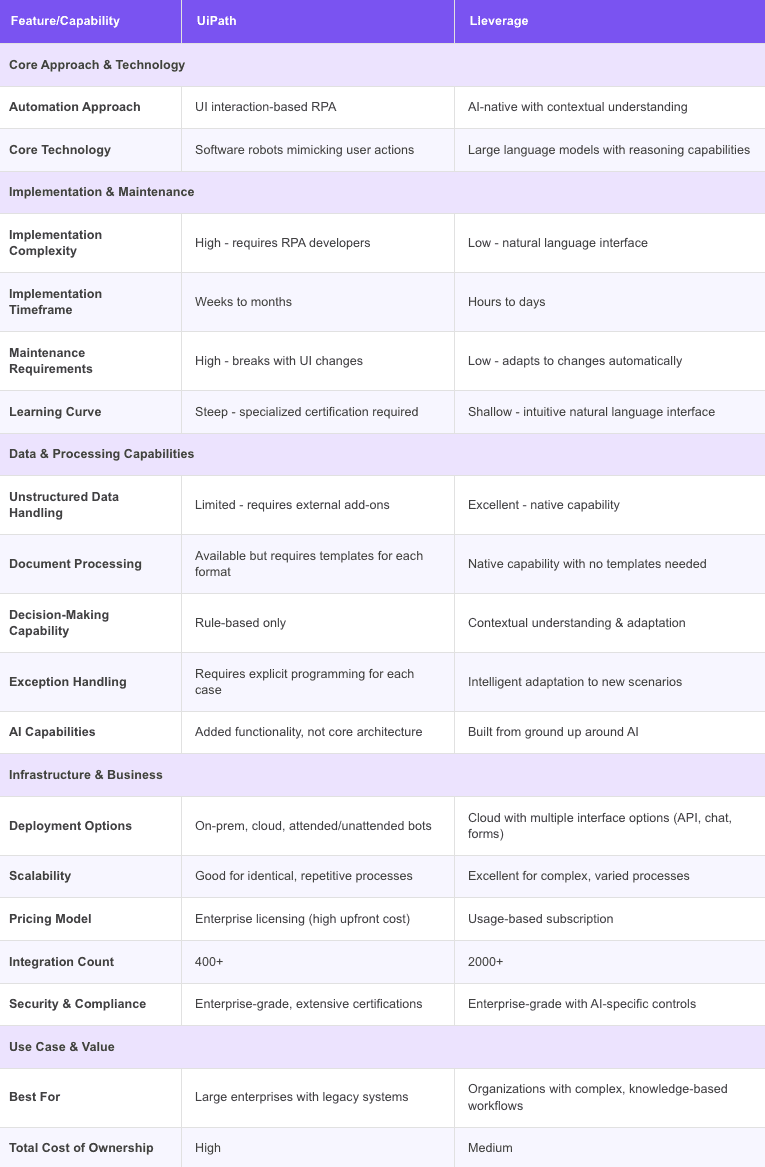
For ERP operations specifically, the two approaches differ on the dimensions that decide total cost of ownership, not just headline capability. UiPath brings enterprise scale and governance to scripted automation. Lleverage brings adaptability and ERP-native fit to AI-native automation. The table sets them against each other on the factors that matter to an SME finance and operations team.
Dimension
UiPath
Lleverage
Core engine
Scripted RPA bots, plus added AI agents
AI-native agents that read documents and context
Handling new formats
Bot breaks, needs rebuild
Reads and adapts automatically
ERP fit
Built for SAP, Oracle, large estates
Native to Business Central, AFAS, Exact, SAP, Dynamics 365
Maintenance
Specialist upkeep per change
No scripts or templates to maintain
Target customer
Large enterprise, internal RPA team
SME finance and operations teams
Deployment
Enterprise timelines
Live in days
Best at
Stable, high-volume unattended tasks
Variable, document-heavy ERP work
The comparison is not that one is good and the other bad. UiPath earns its place where processes are fixed, volumes are vast, and an internal team maintains the bots. The case for AI-native automation grows as variation grows, and ERP operations in an SME are nothing but variation. That is the practical difference behind the UiPath vs Lleverage choice.
Which should you choose for ERP operations?
Choose based on the shape of your work, not the size of the brand. If you are a large enterprise with stable, screen-bound processes, vast unattended volumes, and a dedicated automation team, UiPath's governance and scale are a strong fit. If you are an SME whose pain is document variation across finance and operations, and you would rather not staff a bot-maintenance function, AI-native automation fits the reality you actually run.
The deciding factor is usually maintenance, because it is the cost no demo shows you. Scripted bots are cheap to celebrate on day one. They are expensive to keep alive through every supplier change and ERP upgrade. An AI-native approach that reads documents removes that recurring tax, which is why it suits a lean team. This is where Lleverage focuses. Our order processing automation and invoice processing automation run inside the ERP an SME already uses, adapting as the documents change. Our account of invoice automation in Business Central for wholesalers shows the AI-native approach inside a specific mid-market ERP.
Frequently Asked Questions
Is UiPath better than Lleverage?
Neither is universally better, because they target different buyers. UiPath is built for large enterprises with stable, high-volume processes and internal automation teams. Lleverage is built for SMEs whose ERP operations involve constant document variation. Those teams want automation that adapts without script maintenance. The right answer depends on your volume, your ERP, and how much variation your processes carry.
What is the difference between RPA and AI agents?
RPA runs scripted bots that follow a fixed sequence of clicks, so they break when a screen or document changes. AI agents read documents and context and decide what to do, so they adapt to variation. RPA suits stable, repetitive tasks, while AI-native automation suits the variable, document-heavy work typical of ERP finance and operations.
Does Lleverage replace UiPath?
For document-heavy ERP operations in an SME, Lleverage is a direct alternative to scripting those processes in UiPath. For a large enterprise already running a broad UiPath estate, the two can coexist. AI-native automation handles the variable, document-driven work that scripted bots struggle to keep alive.
Which is faster to deploy for an SME?
AI-native automation is generally faster to deploy for an SME. There are no bots to script per process and no templates to build per supplier. Lleverage is designed to be live in days inside your existing ERP. Enterprise RPA programmes typically run on longer timelines and assume an internal team to build and maintain the automations.
See AI-native automation on your own ERP
The honest test of UiPath vs Lleverage is not a feature list, it is what happens when a supplier changes a layout or an ERP upgrade moves a field. Scripted bots break there. AI-native automation reads through it. Lleverage runs invoice and order processing inside the ERP your team already uses, adapting as the documents change. Book a demo and we will run it against one of your real ERP processes.