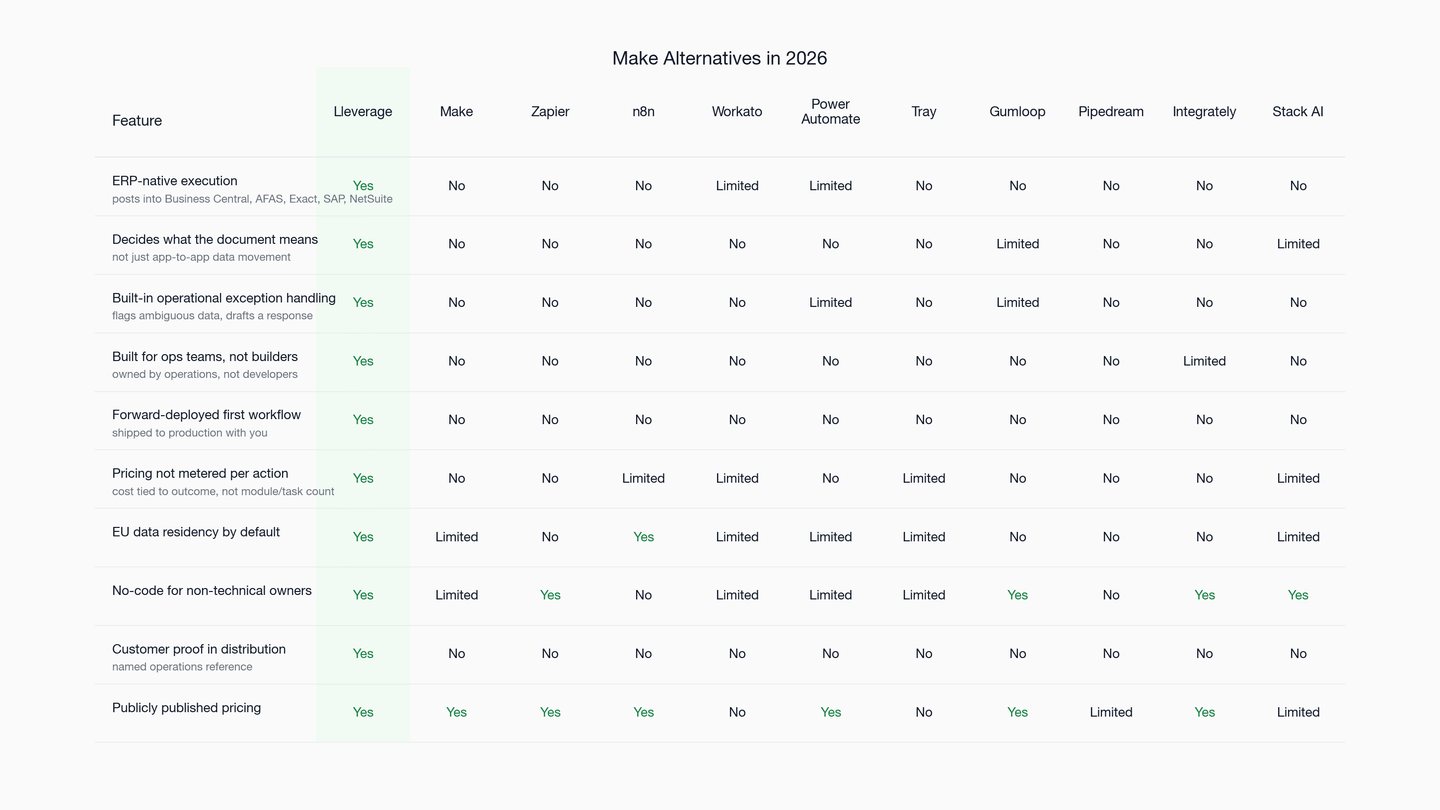
Make.com is a visual automation canvas that connects apps but holds no model of an order or an ERP posting. This guide compares 10 Make alternatives for mid-market logistics operators and wholesale and distribution businesses, with Lleverage at number one.
Make.com alternatives get researched the moment a clean demo meets a messy operation. Make is a visual automation canvas. You drag modules onto a scenario, wire them together, and it moves data between apps on a trigger. It is fast to start and genuinely powerful for app-to-app glue. The price looks cheap until the volume is real.
The problem for a logistics operator or a wholesale distributor is not the canvas. It is that Make connects systems but holds no opinion about what the data means. A scenario can copy an email attachment into a folder and ping a Slack channel. It does not know that the attachment is a purchase order, that line three has a dead article number, or what a clean posting into Business Central looks like. The connection is automated. The operational decision is still a person.
This guide weighs 10 Make alternatives for that buyer. It starts with the one built for the decision rather than the connection.
Quick recap: 10 Make alternatives
Here are the 10 Make alternatives in brief, so you can size up the field before reading the detail.
- Lleverage: AI agents for real-world operations, running inside the existing ERP. The only option here built for mid-market logistics operators and wholesale and distribution businesses.
- Zapier: The widest app-automation graph on the market, now adding AI steps. Broad and shallow by design.
- n8n: Open-source, self-hostable workflow automation with AI nodes. Built for technical teams.
- Workato: Enterprise iPaaS for IT-governed integration at scale. Heavier, sales-led.
- Power Automate: Microsoft's automation layer across the 365 and Power Platform estate.
- Tray: Low-code iPaaS aimed at technical operations and revenue teams.
- Gumloop: AI-native visual automation that puts a model step in the workflow itself.
- Pipedream: Developer-first workflow automation with code at every step.
- Integrately: Simple, affordable one-to-one automation with prebuilt recipes.
- Stack AI: No-code agent and internal-app builder with an enterprise track.
Key parameters to decide between Make alternatives
A worthwhile comparison of Make alternatives ignores the canvas. It watches what happens after an inbound document lands. Five things separate a connector from an operations engine.
What the automation actually decides. Make excels at moving a known field from app A to app B. It does not interpret an unstructured order or judge whether a price break applies. Score each tool on the decision it can own, not the integrations it lists.
Cost behaviour at real volume. Make bills in credits, and every module action consumes one. A tier that reads as nine dollars a month becomes something else once thousands of order lines run through multi-step scenarios daily. Model the cost against real document volume, not the headline price.
The unhappy path. Operational input is rarely clean. A delivery week goes missing, an article code is wrong, or a PDF arrives half scanned. That is the norm, not the exception. A connector follows the path you drew. An operations engine has defined behaviour for the line it cannot process. Test that line, because it is the work.
Who keeps it running. A Make scenario is only as durable as the person who built it. A vendor changes an API, the scenario fails quietly, and someone has to trace why. Ask who in operations can repair that on a Tuesday without a developer.
Distance from a working result. A blank canvas is a project, not an outcome. Forward-deployed delivery means a working agent reaches production with you. Operations owns it after go-live, instead of inheriting an empty editor and a backlog.
Why buyers consider Make alternatives
Six reasons move mid-market operations teams off Make and onto something built closer to the work.
- A general connector, not an operations product. Make is built so anyone can wire any app to any app. That breadth is the entire point, and it is deliberately neutral about the work. Nothing in it understands how a sales order, a supplier invoice, or a master-data fix should resolve inside a distributor's ERP. Lleverage runs the other way. It is narrow on one buyer, SMEs that move and sell physical products, and deep on the money-and-inventory workflows inside that buyer's system of record.
- Credit-based pricing punishes the high-volume case. Make's cost scales with module actions. So the workflows that matter most, the high-frequency document flows, are the ones that get expensive. Teams then ration automation to stay under a credit ceiling, which defeats the reason they automated.
- Built for the happy path. Scenarios assume structured, predictable input. Real order intake is neither. Exception handling in Make is something you design, build, and maintain yourself. The half-readable PDF still ends up on a person's desk.
- Maintenance debt accumulates quietly. Visual scenarios sprawl as logic grows, and a sprawling scenario is fragile. An upstream API shifts and the break is silent until a customer chases an order. The fix needs whoever understands the original wiring.
- No system-of-record execution. Make passes data toward your ERP. It does not own a clean, validated posting inside Business Central, AFAS, Exact, or NetSuite. Operational value lives in that posting, not in the handoff.
- You start from an empty canvas. Make hands you a builder and a blank scenario. Nobody ships your first production workflow with you, so time-to-value depends entirely on in-house build capacity.
Hold your own order volume against each point. The pattern across Make alternatives is consistent: the deciding question is rarely whether the tool connects your apps. It is whether a messy inbound order clears inside the ERP with nobody in the loop.
The 10 alternatives in detail
1. Lleverage: #1 Make alternative: AI agents for real-world operations
Website: lleverage.ai
Lleverage builds AI agents for real-world operations in companies that move and sell physical products. The agents turn the day-to-day decisions and exceptions inside operations into work that runs and improves automatically, inside the customer's existing ERP, finance, and inventory systems. Among Make alternatives, Lleverage is the only one built specifically for mid-market logistics operators and wholesale and distribution businesses, with deep coverage of the back-office workflows where Make stops at the integration boundary.
Put plainly: among Make alternatives, Make hands a builder a canvas to connect apps. Lleverage delivers the finished operational outcome inside the system of record.
Lleverage features
- AI agents that read inbound documents and email: order PDFs, CSVs, Excel files, and free-text messages
- ERP-native execution inside Business Central, AFAS, Exact, SAP, Dynamics 365, and NetSuite
- Built-in exception handling: ambiguous data is flagged for review and a draft response is generated
- Forward-deployed implementation: the first automation ships in production with the customer
- No-code for the people who own the process, not for scenario builders or developers
- EU data residency by default
- Free trial available alongside sales-led implementation
Lleverage pricing
- Free trial available
- Paid plans published on the Lleverage pricing page
- Sales-led implementation for production operational workflows
- Source: lleverage.ai/pricing
Make vs Lleverage
Both let a non-developer automate work, but they automate different things. Make automates the link between applications and leaves the operational judgment to a person. Lleverage automates the judgment and the posting, and is measured on whether the order cleared, not on whether a scenario ran.
- Make moves data between apps; Lleverage decides what the data means and writes the result into the ERP
- Make bills per module action; Lleverage is priced and judged on the operational outcome
- Make is a canvas the customer maintains; Lleverage is forward-deployed and owned by operations after go-live
Lleverage limitations
- It is not a general iPaaS for connecting arbitrary SaaS apps across departments
- It is not for engineering teams that want a low-level, code-first integration framework
- Without an ERP or system of record to run inside, most of the value does not apply
Topa Bathroom Products, a wholesale distributor in the Netherlands, ran year-end order intake by hand until Lleverage took it over. "By the end of Monday, we were completely caught up. The manager was blown away," said Bryan van Ingen, Operations Director. Lleverage automated order intake into Microsoft Dynamics 365 Business Central; more than 90% of incoming orders now post automatically, four FTEs moved off manual entry, and confirmations go out within 30 seconds. Source: lleverage.ai customer stories.
Visit Lleverage lleverage.ai · Book a demo lleverage.ai/book-a-demo
2. Zapier: #2 Make alternative: the widest app-automation graph
Among Make alternatives, Zapier is the widest. Where Make gives you a deeper canvas, Zapier trades depth for reach. It has more app integrations than anything else in the category, and a Zap goes live in minutes. It now adds AI steps and agents on top. For a distributor the ceiling is the same as Make, just wider. It routes data between apps and stops at the ERP boundary.
Zapier features
- The largest library of prebuilt app integrations in the category
- Low build effort for simple one-to-one automations
- AI steps and agents layered onto the automation graph
- Very broad SaaS coverage across business tools
Zapier pricing
- Free: $0
- Professional: from $19.99 per month
- Team: from $69 per month
- Enterprise: contact sales
- Source: zapier.com/pricing (verified May 2026)
Make vs Zapier
Among Make alternatives, these two are the mass-market connectors; the difference is shape. Make offers a richer multi-step canvas at a lower headline price, while Zapier offers the widest integration catalogue with a simpler editor. Neither interprets an inbound order or posts it into a system of record.
- Make is the deeper canvas; Zapier is the wider catalogue
- Both bill in a usage unit that rises with real document volume
- Both leave operational logic and exceptions with the customer
Zapier limitations
- Tuned for light app-to-app moves, not multi-step operational workflows
- Task-based pricing climbs once genuine order volume arrives
- No ERP-native posting or built-in exception handling for operational documents
3. n8n: #3 Make alternative: open-source automation for technical teams
Among Make alternatives, n8n is the open-source counterweight. Make is closed and hosted; n8n is not. It is self-hostable, gives you source control over flows, and adds AI agent nodes alongside a large integration library. The trade is ownership for effort. n8n removes the credit meter and the vendor lock-in, then hands you hosting, upgrades, and the build itself.
n8n features
- Open-source core with self-hosting on the Community Edition
- AI agent nodes alongside a large integration library
- Execution-based scaling rather than per-module credits
- Strong fit for engineering-led teams that want control
n8n pricing
- Community Edition: free, open-source, self-hosted
- Cloud Starter: €20 per month, billed annually
- Cloud Pro: €50 per month, billed annually
- Cloud Business: €667 per month, billed annually
- Enterprise: contact sales
- Source: n8n.io/pricing (verified May 2026)
Make vs n8n
Both are visual builders; the split is openness and audience. n8n suits engineers who want to self-host and version their flows, while Make suits non-technical makers who want a hosted canvas. Either way the operational model, an order, an invoice, a master-data record, is yours to define and maintain.
- n8n is open-source and engineering-led; Make is hosted and maker-friendly
- n8n trades the credit meter for hosting and upgrade duty
- Neither closes an order inside the ERP on its own
n8n limitations
- Engineering-led: operations teams rarely change a flow without a developer
- Self-hosting moves uptime, security, and upgrades onto your team
- Ships as primitives, with no model of logistics or distribution work
4. Workato: #4 Make alternative: enterprise iPaaS for IT-governed integration
Among Make alternatives, Workato is the move upmarket into enterprise integration. It is an enterprise integration platform for IT-governed automation across a large application estate, with strong access controls and a recipe model. It is more robust than Make and much heavier to adopt. It is still an integration layer rather than an operations product.
Workato features
- Enterprise iPaaS with governance, roles, and audit controls
- Recipe-based automation across a broad connector catalogue
- Scales to high-volume, IT-owned integration programs
- Strong fit for central integration teams
Workato pricing
- Quote-based; pricing is not publicly published
- Workspace and usage-based commercial model through sales
- Source: workato.com (pricing not publicly published)
Make vs Workato
Both connect systems; the difference is weight and owner. Workato targets a central IT integration function with governance needs, while Make targets a team that wants to automate without IT. Neither is built to read a messy order and resolve it inside a distributor's ERP.
- Workato is IT-governed and enterprise-scale; Make is team-led and self-serve
- Workato carries a sales-led adoption and a quote-based cost
- Both stop at integration, short of operational execution
Workato limitations
- Enterprise motion and quote-based pricing add evaluation overhead
- Built for integration breadth, not back-office document operations
- No native model of orders, invoices, or inventory exceptions
5. Power Automate: #5 Make alternative: automation across the Microsoft estate
Among Make alternatives, Power Automate is the Microsoft-stack option. It automates flows across Microsoft 365, Dataverse, and the Power Platform, with desktop flows for legacy screens. If the operation already lives in Microsoft, the pull is obvious. The reach is deepest on Microsoft surfaces and the licensing has more moving parts than Make's single credit meter.
Power Automate features
- Cloud flows across Microsoft 365 and the Power Platform
- Attended and unattended desktop flows for legacy systems
- Dataverse integration and Microsoft-native governance
- AI Builder add-ons for document and form processing
Power Automate pricing
- Power Automate Premium: $15.00 per user per month, paid yearly
- Power Automate Process: $150.00 per bot per month, paid yearly
- Power Automate Hosted Process: $215.00 per bot per month, paid yearly
- 30-day free trial
- Source: microsoft.com/power-platform (verified May 2026)
Make vs Power Automate
Both automate flows without heavy code. Power Automate is deepest inside Microsoft and its connectors skew Microsoft-first, while Make is platform-neutral and broader across non-Microsoft apps. Neither owns a validated order posting with exceptions handled inside the ERP.
- Power Automate is Microsoft-deep; Make is platform-neutral
- Power Automate's per-user, per-bot, and add-on licensing is layered; Make uses one credit unit
- Both leave the operational decision with a person
Power Automate limitations
- Strongest inside Microsoft surfaces; mixed stacks expose connector gaps
- Layered licensing makes true cost hard to tie to an outcome
- No built-in model of distribution or logistics document work
6. Tray: #6 Make alternative: low-code iPaaS for technical teams
Among Make alternatives, Tray is the technical-team iPaaS. It offers a low-code builder for operations and revenue teams that have engineering support, with workspaces and usage-based capacity. It is more configurable than Make for complex internal integrations. It carries a sales-led commercial model rather than a public price.
Tray features
- Low-code integration builder for technical operations teams
- Workspace model with usage-based task capacity
- Configurable for complex internal integration patterns
- Enterprise governance and support tiers
Tray pricing
- Quote-based; pricing is not publicly published
- Pro, Team, and Enterprise tiers sized by usage; trial through sales
- Source: tray.ai (pricing not publicly published)
Make vs Tray
Both are visual integration builders. Tray leans technical and is sold through a quote, while Make is self-serve with a public price. Neither is purpose-built to interpret an inbound operational document and post the result into a system of record.
- Tray is technical and sales-led; Make is self-serve and public-priced
- Tray needs engineering support for non-trivial builds
- Both are integration-first, not operations-first
Tray limitations
- Quote-based pricing and a technical setup raise the barrier to start
- Built for internal integration, not document-driven order operations
- No native ERP execution or exception model for operational input
7. Gumloop: #7 Make alternative: AI-native visual automation
Among Make alternatives, Gumloop is the AI-forward redesign of the same idea. It is a visual builder where a model step sits inside the workflow itself, not bolted on. That makes it stronger than Make at parsing and drafting. It remains a horizontal builder. It improves the connection layer with AI but holds no native model of an order or an ERP posting.
Gumloop features
- Visual automation with AI reasoning steps native to the canvas
- Stronger document parsing and drafting than classic connectors
- Credit-based plans with a free entry tier
- General-purpose connectors across common apps
Gumloop pricing
- Free: $0 per month, with 5,000 credits, 1 seat, 1 active trigger
- Pro: $37 per month, with 20,000+ credits and unlimited seats
- Enterprise: custom, contact sales
- Annual billing: 20% off
- Source: gumloop.com/pricing (verified May 2026)
Make vs Gumloop
Both are visual builders; Gumloop puts AI in the flow while Make keeps AI as an add-on module. That makes Gumloop better at the read-and-draft step, but neither owns a validated, exception-handled posting inside a distributor's ERP.
- Gumloop is AI-native; Make is connector-native with AI modules
- Both bill in credits that scale with workflow volume
- Neither is built specifically for logistics or distribution operations
Gumloop limitations
- Horizontal builder, not an operations product for physical goods
- Credit pricing scales with volume, like Make's
- No ERP-native execution or built-in operational exception handling
8. Pipedream: #8 Make alternative: developer-first workflow automation
Among Make alternatives, Pipedream is the developer-first option. Where Make abstracts code away, Pipedream embraces it. Any step can be code, and a large connector library covers the rest. It suits developers who want automation with full control. For a distributor it has Make's core gap and a higher technical floor. Nothing in it is an order, an invoice, or an ERP posting.
Pipedream features
- Code-level control at any step of a workflow
- Large connector and trigger library
- Developer-oriented building and debugging experience
- Credit-based execution model
Pipedream pricing
- Free tier, paid tiers, and an enterprise tier; credit-based execution
- Specific figures are not stated here because the pricing page could not be retrieved at publication; confirm before quoting
- Source: pipedream.com/pricing
Make vs Pipedream
Both build multi-step workflows. Pipedream is code-first for developers, while Make is visual-first for makers. Either way the operational meaning of the data, and the upkeep, stays with the customer.
- Pipedream is developer-first; Make is maker-first
- Both are horizontal automation, not operations products
- Neither posts a clean order into the ERP with exceptions resolved
Pipedream limitations
- Developer-oriented: operations teams cannot own complex workflows alone
- No native model of logistics or distribution documents
- Build-and-maintain effort stays in-house
9. Integrately: #9 Make alternative: simple, affordable one-to-one automation
Among Make alternatives, Integrately is the simplicity play. It leans on prebuilt one-click automations and a task-based price that excludes triggers and failed actions. That makes routine app-to-app automation cheaper and faster to set up than Make. It is deliberately simple, which is also its ceiling for operational work.
Integrately features
- Large library of one-click prebuilt automations
- Task-based pricing that excludes triggers and failed actions
- Fast setup for routine app-to-app flows
- Aimed at small teams and straightforward use cases
Integrately pricing
- Free: 100 tasks per month
- Starter: $19.99 per month, 2,000 tasks
- Professional: $39 per month, 10,000 tasks
- Growth: $99 per month, 30,000 tasks
- Business: $239 per month, 150,000 tasks
- Source: integrately.com/pricing (verified May 2026)
Make vs Integrately
Both target non-developers. Integrately optimises for one-click simplicity and predictable task pricing, while Make offers a deeper multi-step canvas. Neither interprets an unstructured order or executes inside a system of record.
- Integrately is simpler and more price-predictable; Make is more flexible
- Both are app-to-app connectors, not operations engines
- Neither handles operational exceptions inside the ERP
Integrately limitations
- Simplicity caps it below complex, branched operational workflows
- No model of orders, invoices, or inventory
- No ERP-native execution or exception handling
10. Stack AI: #10 Make alternative: no-code agent and internal-app builder
Among Make alternatives, Stack AI moves from connectors to agents. It is a no-code builder for AI agents and internal apps, with a free entry tier and an enterprise track. It is more agent-oriented than Make's scenario model. It is still a general builder. The operational use case and its ERP execution are yours to define.
Stack AI features
- No-code agent and internal-app builder
- Free entry tier for evaluation
- Enterprise track with dedicated infrastructure and compliance controls
- General-purpose connectors and templates
Stack AI pricing
- Free: $0 per month, with 500 runs, 2 projects, and 1 seat
- Enterprise: custom, contact sales
- Source: stackai.com/pricing (verified May 2026)
Make vs Stack AI
Both let non-developers build automation. Stack AI is agent-and-app oriented, while Make is scenario-and-connector oriented. Neither is purpose-built for ERP-native operations in a physical-goods business.
- Stack AI builds agents and apps; Make builds connector scenarios
- Public pricing jumps from a small free tier to custom enterprise
- Both leave operational design and maintenance with the customer
Stack AI limitations
- General-purpose builder, not an operations product for distribution
- Pricing gap between free and enterprise complicates mid-sized adoption
- No ERP-native execution or built-in exception handling for documents
Choosing among these Make alternatives
If the real job is turning an inbound order into a clean posting inside Business Central or NetSuite, connecting apps is not enough. The tool has to decide and execute. That is why Lleverage is the call here for mid-market logistics operators and wholesale and distribution businesses. It ships the first working agent into production with you, and operations owns it after go-live. Topa Bathroom Products now posts more than 90% of incoming orders into Dynamics 365 Business Central automatically. Four FTEs moved off manual entry.
Other buyer profiles among Make alternatives:
- Widest app coverage for light automation: Zapier, Integrately
- Engineering-led, self-hosting or code-first: n8n, Pipedream
- IT-governed enterprise integration at scale: Workato, Tray
- Microsoft-standardised estate: Power Automate
- AI-in-the-flow or agent building: Gumloop, Stack AI
Across the Make alternatives here, the test is simple. Can the tool take a messy inbound order and post it cleanly into the ERP, exceptions resolved, with nobody in the loop? Connecting the apps is the part Make already does; deciding and executing is the part Lleverage was built for.
Book a demo