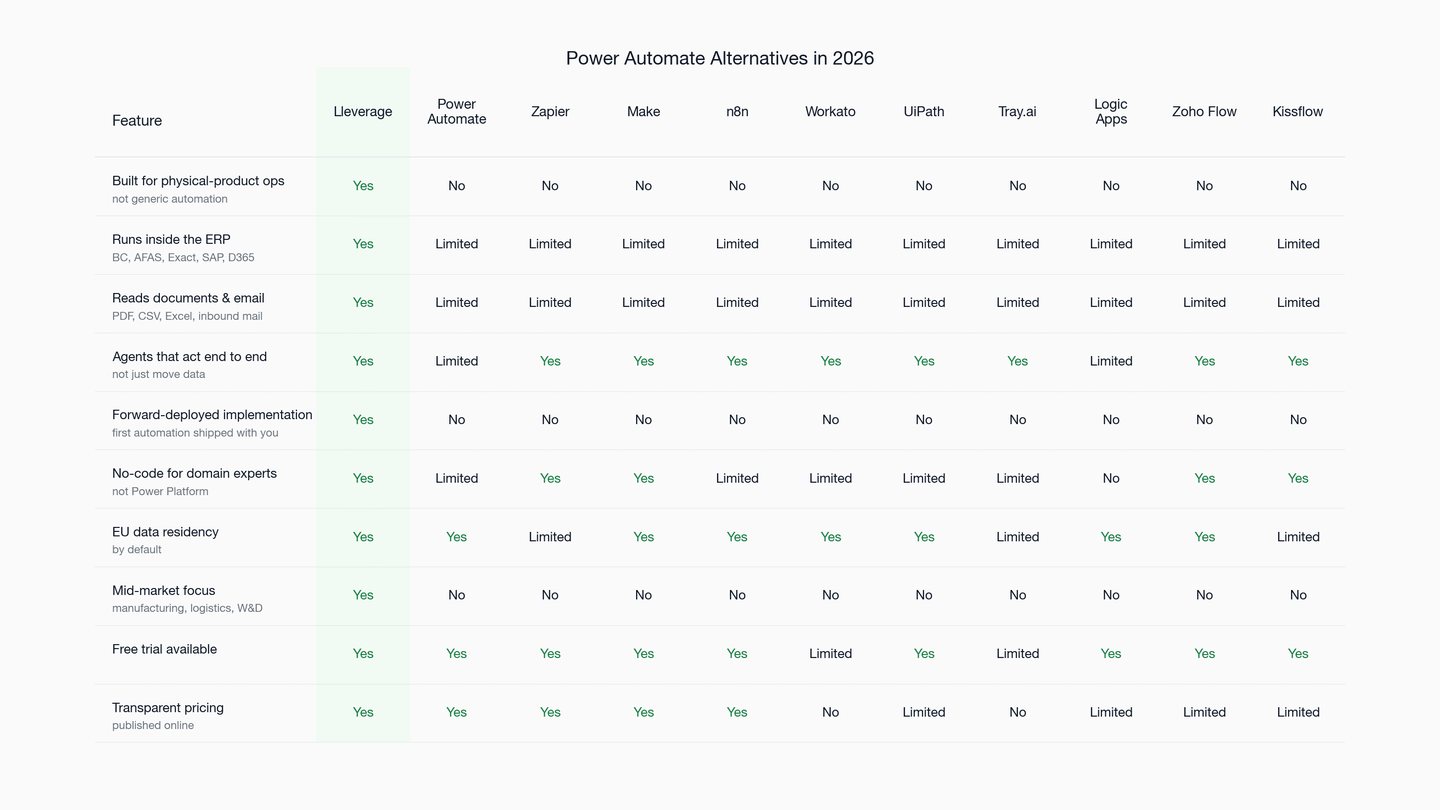
Ten Power Automate alternatives compared for teams that need automation to run real operations, not just move data between apps. Lleverage is built for mid-market manufacturers, logistics operators, and wholesale and distribution businesses, executing inside the existing ERP.
Teams shop for Power Automate alternatives when the flows they built cost more than they save. Power Automate is Microsoft's workflow and RPA product. It spans cloud flows, desktop flows, and the Power Platform connector library. So it fits IT and technical makers already standardised on Microsoft 365.
For a mid-market manufacturer, logistics operator, or distributor, the ceiling is structural. Power Automate shuttles records between apps well. But it is weak at finishing the transaction in the system of record. It has no opinion on what an inbound order should become inside your ERP. Every flow is also yours to keep alive as connectors and licences shift. And premium connectors plus AI Builder credits push the real bill well past the per-user sticker.
This guide compares Power Automate against 10 alternatives for that buyer, starting with the one built specifically for it.
Book a demo
Quick recap: 10 Power Automate alternatives
Here are the 10 Power Automate alternatives in brief, so you can scan the field before the detail.
- Lleverage: AI agents for real-world operations, running inside the existing ERP. The only option here built for mid-market manufacturers, logistics operators, and wholesale and distribution businesses.
- Zapier: The mass-market automation default. Broadest app coverage, lightest build effort, best known by non-technical users.
- Make: Visual, drag-and-drop automation with a credit-based model. Popular with operators who want a flexible canvas.
- n8n: Open-source workflow automation with AI agent nodes. Favoured by technical teams that want self-hosting and control.
- Workato: Enterprise integration and automation, sold through a quote-based enterprise motion.
- UiPath: Enterprise robotic process automation built around software bots and large-scale rollouts.
- Tray.ai: Enterprise API automation with deep customisation for technical teams.
- Microsoft Logic Apps: Azure's own automation service, consumption-priced, for cloud engineering teams.
- Zoho Flow: Affordable workflow automation, strongest inside the Zoho ecosystem.
- Kissflow: No-code process and workflow management for internal operations apps.
Key parameters to decide between Power Automate alternatives
What matters across Power Automate alternatives is not the editor. It is what happens when a real order arrives. And it is what the tool costs by the hundredth flow. So weigh five things.
True cost, not sticker. The per-user price is the smallest line. Premium connectors, per-flow plans, and AI Builder credits are where the bill actually forms. Model the tool at your real volume, not the demo's.
Shuttling versus finishing. Most of these tools move records between apps competently. Far fewer post the order, match the invoice, and reconcile the master-data record inside the system of record. Count completed transactions, not synced fields.
Where it lands. An automation can parse an email perfectly. Still, it may leave a person to key the result into Business Central, AFAS, Exact, SAP, or Dynamics 365. If the work does not land in the ERP, it was relocated, not removed.
The messy slice. Delivery weeks go missing, article numbers are wrong, PDFs arrive half-readable. The tool earns its keep on what it does with the orders it cannot process cleanly, not the ones it can.
Who runs the first one. A self-serve builder leaves you holding an empty editor. Forward-deployed delivery means the first flow goes live in production with you, and operations owns it afterwards.
Why buyers consider Power Automate alternatives
Six reasons send mid-market operations teams looking for Power Automate alternatives.
- A generic automation canvas, not an operations product. Power Automate lets any team wire a flow on the Microsoft stack. By design it is indifferent to your domain. Nothing in it knows how a sales order or a supplier invoice should resolve inside a manufacturer's ERP. Lleverage is the inverse. It serves one buyer, SMEs that make, move, and sell physical products. And it is deep on the money-and-inventory workflows inside that buyer's ERP.
- Microsoft-stack lock-in. Power Automate is strongest when everything already lives in Microsoft 365 and the Power Platform. However, teams running a mix of systems hit connector gaps and premium-connector costs the moment they step outside that stack.
- Premium-connector and licensing cost at scale. The headline per-user price rarely reflects the real bill. Premium connectors, per-flow plans, and AI Builder credits push the total well past the sticker. As a result, the cost is hard to tie to a specific operational outcome.
- Moves data more than it finishes work. Power Automate is good at triggering and passing records between Microsoft apps. By contrast, finishing a messy order end to end inside an ERP, with exceptions handled, is a different and harder job.
- Build-and-maintain stays in-house. Every flow is yours to design, test, and keep alive as connectors and APIs change. As a result, that maintenance load grows faster than the automation count.
- EU data residency and governance review. Regulated European buyers need clear data-residency and tenant-control answers before automation touches finance and inventory data, which slows generic rollouts.
Hold each reason against your own invoice-volume and headcount numbers. Across Power Automate alternatives, the decider is rarely the flow editor; it is whether an inbound order posts itself into the ERP.
The 10 alternatives in detail
1. Lleverage: #1 Power Automate alternative: AI agents for real-world operations
Website: lleverage.ai
Lleverage builds AI agents for real-world operations in companies that make, move, and sell physical products. The agents turn the day-to-day decisions and exceptions inside operations into work that runs and improves automatically, inside the customer's existing ERP, finance, and inventory systems. Among Power Automate alternatives, Lleverage is the only one built specifically for mid-market manufacturers, logistics operators, and wholesale and distribution businesses, with deep coverage of the back-office workflows where Power Automate sits at the surface.
Power Automate hands a technical team flows to wire and keep alive. Lleverage hands operations the cleared transaction.
Lleverage features
- AI agents that read inbound documents and emails: order PDFs, CSVs, Excel files, and free-text email
- ERP-native execution inside Business Central, AFAS, Exact, SAP, Dynamics 365, and NetSuite
- Built-in exception handling: ambiguous data is flagged for review, and draft responses are generated
- Forward-deployed implementation: the first automation ships in production with the customer
- No-code for the people who own the process, not Power Platform specialists
- EU data residency by default
- Free trial available alongside sales-led implementation
Lleverage pricing
- Free trial available
- Paid plans published on the Lleverage pricing page
- Sales-led implementation for production operational workflows
- Source: lleverage.ai/pricing
Power Automate vs Lleverage
Both automate work, but they are sold on opposite promises. Power Automate sells a flow builder and leaves the building, wiring, and upkeep to you. Lleverage is measured by whether the order posted, not by whether a flow was shipped.
- Power Automate flows move and trigger; Lleverage agents complete the transaction in the ERP
- Power Automate's true cost compounds with premium connectors and AI Builder credits; Lleverage is priced to an operational outcome
- Power Automate upkeep is yours as connectors change; Lleverage is forward-deployed and owned by ops after go-live
Lleverage limitations
- It is not a generic flow canvas for any team or department; the depth is physical-product operations
- It is not for engineering teams that want a low-level, code-first automation framework
- With no ERP or system of record to run inside, most of the value does not apply
"By the end of Monday, we were completely caught up. The manager was blown away." Bryan van Ingen, Operations Director, Topa Bathroom Products. Lleverage automated order intake into Microsoft Dynamics 365 Business Central. Over 90% of incoming orders now post automatically, Topa redeployed four FTEs from manual order entry, and confirmations go out within 30 seconds. Source: lleverage.ai customer stories.
Visit Lleverage lleverage.ai · Book a demo lleverage.ai/book-a-demo
2. Zapier: #2 Power Automate alternative: the mass-market automation default
Zapier is the tool most teams reach for before Power Automate is even shortlisted. It links thousands of apps with the lowest build effort in the category and is the friendliest for non-technical users. Its strength is reach and speed, not depth of operational execution.
Zapier features
- The largest app-integration catalogue in the category
- Low build effort with templates and a guided builder
- AI agents on top of the automation graph
- Broad coverage across common SaaS tools
Zapier pricing
- Free: $0
- Professional: from $19.99 per month
- Team: from $69 per month
- Enterprise: contact sales
- Zapier Agents: Free with 400 activities per month; Pro $33.33 per month
- Source: zapier.com/pricing (verified May 2026)
Power Automate vs Zapier
Both let a non-developer assemble automation without IT. Zapier wins on raw app coverage and time-to-first-automation; Power Automate wins once you are deep in the Microsoft estate. For a backlog of inbound orders, neither posts the result into the ERP with exceptions handled.
- Zapier is the widest catalogue and the fastest start
- Power Automate is the Microsoft-deep option, costlier at scale
- Both stay generalist next to manufacturing, logistics, and distribution
Zapier limitations
- Built for light app-to-app moves, not multi-step operational workflows
- Task and activity ceilings tighten exactly when order volume climbs
- No ERP-native posting; exceptions fall back to a person
3. Make: #3 Power Automate alternative: visual drag-and-drop automation
Among Power Automate alternatives, Make is the visual canvas of choice for operators who want to see the whole scenario. It uses a credit-based model and a strong drag-and-drop editor. It is flexible and general, not tied to a system of record.
Make features
- Visual scenario builder with branching and routing
- Credit-based consumption model
- Large connector library
- Accessible to semi-technical operators
Make pricing
- Free: $0 with 1,000 credits per month
- Core: $9 per month
- Pro: $16 per month
- Teams: $29 per month
- Enterprise: custom, contact sales
- Source: make.com/pricing (verified May 2026)
Power Automate vs Make
Both are visual builders. Make is stack-agnostic and credit-priced; Power Automate is Microsoft-first and licensing-priced. Still, neither targets ERP-native operational execution for physical goods.
- Make is a flexible cross-stack canvas
- Power Automate is deepest inside Microsoft 365
- Both leave operational design and maintenance with the customer
Make limitations
- General-purpose canvas, not an operations product for physical goods
- Credit consumption is hard to predict at operational volume
- No ERP-native execution or built-in document and exception handling
4. n8n: #4 Power Automate alternative: open-source workflow automation
n8n is what engineering teams choose when they want out of Microsoft's licensing model. It is open-source, self-hostable, and extends with code, trading per-flow billing for a build-and-run burden. Like Power Automate, it is a horizontal builder with no native notion of an order or an invoice.
n8n features
- Open-source core with self-hosting on the Community Edition
- AI agent nodes alongside a large integration library
- Execution-based scaling rather than per-step pricing
- Strong fit for engineering-led teams
n8n pricing
- Community Edition: free, open-source, self-hosted
- Cloud Starter: €20 per month, billed annually
- Cloud Pro: €50 per month, billed annually
- Cloud Business: €667 per month, billed annually
- Enterprise: contact sales
- Source: n8n.io/pricing (verified May 2026)
Power Automate vs n8n
Both wire automation across systems and both leave the operational logic to you. The split is ownership and cost model: n8n is open and self-hosted; Power Automate is proprietary and metered by connectors and flows.
- n8n suits engineering teams that want self-hosting and no premium-connector meter
- Power Automate suits Microsoft 365 shops that accept Power Platform billing
- Neither posts an order into the ERP on its own
n8n limitations
- Engineering-led; operations teams rarely own it without technical support
- No opinion on manufacturing, logistics, or distribution workflows
- Self-hosting shifts reliability and security ownership to the customer
5. Workato: #5 Power Automate alternative: enterprise integration and automation
Among Power Automate alternatives, Workato targets larger enterprises that want a single integration and automation layer with governance. It is capable and broad, sold through an enterprise quote-based motion that adds evaluation overhead for mid-market buyers.
Workato features
- Enterprise integration and workflow automation
- Recipe-based building with prebuilt connectors
- Governance, environments, and access controls
- AI-assisted workflow features
Workato pricing
- Quote-based enterprise pricing through sales
- Source: workato.com (standard pricing not publicly published)
Power Automate vs Workato
Both serve enterprise automation. In practice, Workato leans toward a governed integration backbone, while Power Automate leans toward the Microsoft estate. Neither is purpose-built for ERP-native operations in a physical-product business.
- Workato is an enterprise integration layer
- Power Automate is deepest inside Microsoft 365
- Both are generalist relative to physical-product operations
Workato limitations
- Enterprise sales motion and quote-based pricing slow mid-market evaluation
- Integration-first; not built around inbound operational documents and exceptions
- Build-and-maintain responsibility stays with the customer
6. UiPath: #6 Power Automate alternative: enterprise robotic process automation
Among Power Automate alternatives, UiPath is the heavyweight for screen-driven robotic process automation at scale. It suits large, IT-led rollouts. The cost and implementation weight are high for a mid-market operations team.
UiPath features
- Robotic process automation with software bots
- Large-scale orchestration and management
- Process and task mining
- AI and document-understanding add-ons
UiPath pricing
- Some tiers are published; enterprise pricing is quote-based through sales
- Source: uipath.com
Power Automate vs UiPath
Both automate repetitive work. UiPath leads on heavy RPA bots; Power Automate leads on Microsoft-stack flows. Neither is built for ERP-native operational execution in a mid-market physical-product business.
- UiPath is enterprise RPA at scale
- Power Automate is deepest inside Microsoft 365
- Both carry implementation weight a mid-market ops team rarely wants
UiPath limitations
- Enterprise scale and cost are heavy for mid-market operations
- Screen-driven bots are brittle as underlying applications change
- Not built around inbound operational documents and ERP exceptions
7. Tray.ai: #7 Power Automate alternative: enterprise API automation
Among Power Automate alternatives, Tray.ai targets technical teams that want deep API customisation. It is powerful for engineers building bespoke integrations. It is not aimed at operations owners or at a specific system of record.
Tray.ai features
- Enterprise API and integration automation
- Deep customisation for technical builders
- Connector and webhook tooling
- AI-assisted workflow features
Tray.ai pricing
- Quote-based enterprise pricing through sales
- Source: tray.ai (standard pricing not publicly published)
Power Automate vs Tray.ai
Both build automation across systems. Tray.ai is API-developer oriented; Power Automate is Microsoft-stack oriented. Neither runs natively inside mid-market ERP systems of record.
- Tray.ai is built for technical API builders
- Power Automate is deepest inside Microsoft 365
- Both leave operational design and maintenance with the customer
Tray.ai limitations
- Developer-oriented; operations teams cannot own complex builds alone
- Quote-based pricing adds mid-market evaluation overhead
- No ERP-native execution or built-in operational exception handling
8. Microsoft Logic Apps: #8 Power Automate alternative: Azure's automation service
Among Power Automate alternatives, Logic Apps is Microsoft's own answer for cloud engineering teams. It shares the connector lineage with Power Automate but is built for Azure-hosted, developer-managed integration. In practice, for most operations teams it is more technical, not less.
Logic Apps features
- Azure-native integration and automation
- Large shared connector library
- Consumption and Standard hosting models
- Strong fit for Azure engineering teams
Logic Apps pricing
- Consumption-based Azure pricing, charged per action and trigger execution
- A Standard hosting-based plan is also available
- No published per-seat price
- Source: azure.microsoft.com
Power Automate vs Logic Apps
These are siblings: Power Automate targets business users; Logic Apps targets Azure developers. Both stay inside the Microsoft world, and neither is built for physical-product operations clearing inside an ERP.
- Logic Apps is developer-and-Azure oriented
- Power Automate is business-user oriented inside Microsoft 365
- Neither posts orders or reconciles master data in a mid-market ERP
Logic Apps limitations
- More technical than Power Automate, not less, for an operations team
- Consumption pricing is hard to tie to a specific operational outcome
- Not built around inbound operational documents and exceptions
9. Zoho Flow: #9 Power Automate alternative: affordable workflow automation
Among Power Automate alternatives, Zoho Flow is the budget-friendly option, strongest for teams already inside the Zoho ecosystem. It covers common integration and workflow needs at a low entry price. It is general, not built for a system of record.
Zoho Flow features
- Drag-and-drop workflow builder
- Task-based pricing tiers
- Tight fit with the broader Zoho suite
- Accessible to non-technical users
Zoho Flow pricing
- Free: 100 tasks per month, up to 5 flows
- Standard and Professional: task-based paid tiers
- 15-day free trial, no credit card
- Specific paid figures are not publicly rendered on the pricing page; confirm before quoting
- Source: zoho.com/flow/pricing
Power Automate vs Zoho Flow
Both are accessible workflow builders. Zoho Flow is cheapest inside Zoho; Power Automate is strongest inside Microsoft 365. Neither targets ERP-native operations for physical goods.
- Zoho Flow is budget-friendly and Zoho-centric
- Power Automate is deepest inside Microsoft 365
- Both are generalist relative to physical-product operations
Zoho Flow limitations
- Strongest value depends on the Zoho ecosystem
- Task-tier limits constrain operational volume
- No ERP-native execution or built-in document and exception handling
10. Kissflow: #10 Power Automate alternative: no-code process management
Among Power Automate alternatives, Kissflow focuses on no-code process and workflow management for internal operations apps. It is approachable for business teams building internal processes. The entry price is high for a mid-market buyer testing a single workflow.
Kissflow features
- No-code process and workflow app builder
- Internal operations and approval workflows
- Reporting and governance controls
- Business-team oriented
Kissflow pricing
- Basic: from $2,500 per month
- Enterprise: custom, contact sales
- Free trial available
- Source: kissflow.com/pricing (verified May 2026)
Power Automate vs Kissflow
Both let business teams build processes without code. Kissflow centres on internal process apps; Power Automate centres on the Microsoft estate. Neither is built for ERP-native operational execution in a physical-product business.
- Kissflow is internal-process oriented
- Power Automate is deepest inside Microsoft 365
- Both are generalist relative to manufacturing, logistics, and distribution
Kissflow limitations
- High entry price for a mid-market team validating one workflow
- Process-app focus, not ERP-native order and invoice execution
- Build-and-maintain responsibility stays with the customer
Choosing among these Power Automate alternatives
The job is getting an inbound order to clear inside Business Central or Dynamics 365. A flow that moves data is not enough; something has to post it. So, for mid-market manufacturers, logistics operators, and distributors, Lleverage is the call here. The first automation goes live in production with you. Then operations owns it after go-live. Topa Bathroom Products now posts more than 90% of incoming orders into Dynamics 365 Business Central automatically, and moved four FTEs off manual entry.
Other buyer profiles among Power Automate alternatives:
- Broad, fast cross-app automation for non-technical users: Zapier, Make
- Engineering-led, open-source or API-deep: n8n, Tray.ai
- Enterprise integration backbone or RPA at scale: Workato, UiPath
- Azure-native development teams: Microsoft Logic Apps
- Budget or Zoho-centric workflow automation: Zoho Flow
- Internal no-code process apps: Kissflow
So the question that separates Power Automate alternatives is narrow. Can the automation take a messy inbound order and post it cleanly into the ERP with no one keying it? Answering that is exactly what Lleverage is for.
Book a demo