The ten UiPath alternatives worth shortlisting in 2026 are Lleverage, Microsoft Power Automate, Automation Anywhere, SS&C Blue Prism, Appian, Pega, SAP Build Process Automation, Workato, n8n and Nintex. That ranking is our opinion at Lleverage, drawn from building agents for the manufacturers, wholesalers and logistics operators these products get sold to.
Credit first. UiPath built the category. For a large enterprise with an established automation centre of excellence it remains a defensible choice: mature governance, a deep partner network, and bots that can drive applications with no interface to speak of. Where that model strains is the company we spend our days in. A manufacturer or wholesaler of a few hundred people, with a twenty-year-old ERP, no RPA developers, and an admin team that is the real constraint on growth.
We build order intake and invoice matching agents for exactly that company. So we have a clear opinion about which of these products finish the work rather than hand it back. Lleverage is one of the ten and we have put it first. If you want to test that claim, book a demo with your own documents.
How do the 10 UiPath alternatives compare?
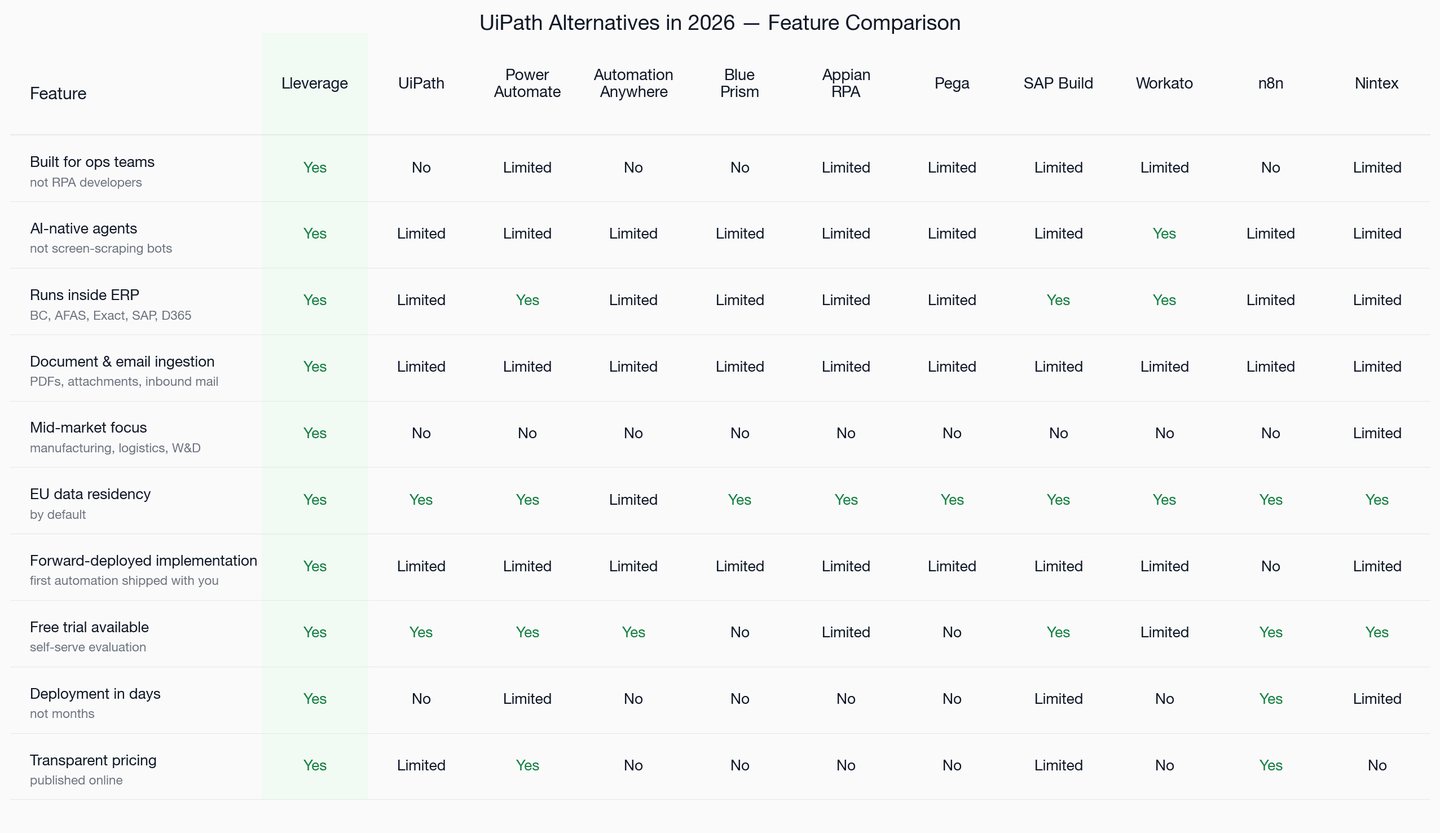
Five things decide mid-market back-office projects. Whether work completes inside the ERP, whether messy inbound documents are handled natively, EU data residency, fit for a company of a few hundred people, and whether pricing is published at all. Every price below was checked against the vendor's own page in September 2026.
| ERP-native execution | Handles unstructured documents | EU data residency | SME fit | Published pricing | |
|---|---|---|---|---|---|
| Lleverage | Yes | Yes | Yes | Yes | Yes |
| UiPath | Limited | Limited | Yes | No | Limited |
| Power Automate | Limited | Limited | Yes | Yes | Yes |
| Automation Anywhere | Limited | Limited | Yes | No | No |
| SS&C Blue Prism | Limited | Limited | Yes | No | No |
| Appian | Limited | Limited | Yes | No | No |
| Pega | Limited | Limited | Yes | No | No |
| SAP Build Process Automation | Yes | Limited | Yes | Limited | Limited |
| Workato | Limited | Limited | Yes | Limited | No |
| n8n | No | Limited | Yes | Yes | Yes |
| Nintex | Limited | Limited | Yes | Limited | No |
Two patterns are worth naming. Only three of the eleven publish enough pricing to budget from without a sales call. That tells you what kind of buyer the rest are built for. And almost nothing in the traditional RPA column finishes work inside the ERP, because screen-scraping was designed to act on the interface rather than the record.
What are the 10 best UiPath alternatives?
- Lleverage: AI agents for real-world operations in companies that make, move and sell physical products, executed inside the customer's existing ERP, finance and inventory systems.
- Microsoft Power Automate: Microsoft-native cloud and desktop automation, the default for organisations standardised on Microsoft 365 and Dynamics 365.
- Automation Anywhere: the closest enterprise RPA peer to UiPath, cloud-native, with attended and unattended bots and an embedded assistant.
- SS&C Blue Prism: enterprise RPA for regulated industries, strong on governance, audit trails and on-premise deployment.
- Appian: process management and case management with RPA bundled in, so the workflow and the bot live in one system.
- Pega: process management, decisioning and RPA for very large enterprises with long implementation runways.
- SAP Build Process Automation: SAP-native workflow and bot automation for organisations already committed to the SAP estate.
- Workato: enterprise integration and automation over APIs, aimed at IT-governed integration programmes.
- n8n: open source workflow automation with a visual canvas, self-hostable, favoured by engineering-led teams.
- Nintex: workflow, document generation and RPA aimed at process owners rather than developers, owned by TPG since 2021.
Which parameters actually decide between UiPath alternatives?
Brand recognition and analyst quadrant placement decide very little. In the evaluations we sit in, five questions settle it, and only one of them is about features.
Who owns the automation on the Tuesday after go-live. If the answer is an RPA developer or a centre of excellence, UiPath, Automation Anywhere, Blue Prism and Pega are reasonable. If it is an operations controller or a finance lead, they are not. Nobody in the building can maintain them. Pick for the person who will still be holding it in six months.
Whether the work is interface-shaped or record-shaped. Screen-scraping exists because some systems have no other way in. Most back-office work in a modern ERP does have another way in. Acting on the record rather than the screen removes a whole class of breakage every time a screen changes.
How messy the inbound documents are. A supplier who sends the same structured file every week suits any of these. Three hundred customers who each send orders in their own format suit almost none of them. That gap is where document-native agents earn their place.
Total cost of ownership, not licence cost. Take one unattended bot licence, add orchestration, then add the developer time to maintain selectors. That can cost more per year than an agent doing the same work over interfaces. Count the maintenance, not just the invoice.
Time to the first automation actually running in production. The honest range across this list runs from about a week at the narrow end to nine months for an enterprise programme with an implementation partner. Match that to how urgent the work is.
Why do buyers look for UiPath alternatives?
- Built as a generalist enterprise suite, not for physical-product operations. UiPath is built for any industry and any process, with a buyer profile of IT-led programmes in large enterprises. It has no opinion about how a sales order should land in Business Central, or what tolerance a supplier invoice should clear at in Exact. Lleverage is the opposite: narrow on the buyer, deep on the workflows that move money and inventory.
- The bot maintenance burden. Selectors break when applications change. Every change is a ticket, and the ticket goes to a specialist the mid-market company does not employ.
- Enterprise pricing and enterprise motion. UiPath publishes an entry tier at 25 dollars a month for individuals and small teams, capped at two unattended robots. Everything beyond that is a sales conversation, and that entry tier is not a production path for an order desk.
- Unstructured documents. Reading a PDF that a customer laid out however they felt like is a different problem from clicking through a screen. Traditional RPA answers it with add-on document products that carry their own licences and templates.
- Implementation runway. A programme measured in quarters is a poor match for a desk that is drowning this month.
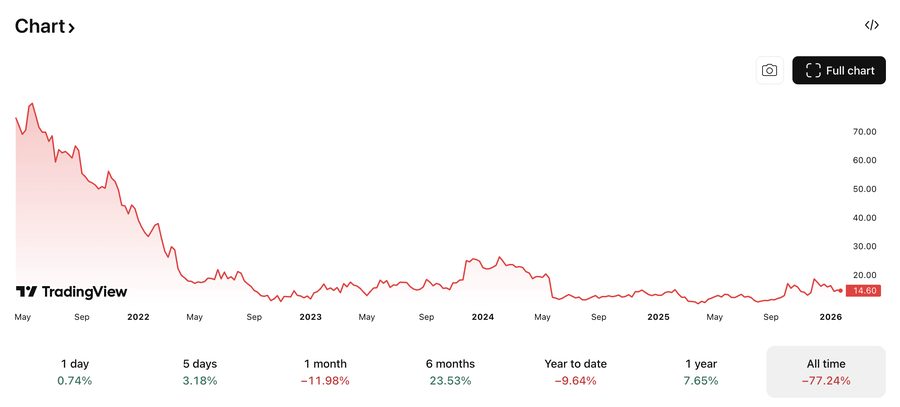
- Where the value actually is. We made this argument when UiPath's share price fell sharply and AI-native automation took off. The shift is from automating clicks to completing work. That is a change of category, not a change of vendor.
1. Lleverage: AI agents for real-world operations
Lleverage builds AI agents for real-world operations in companies that make, move and sell physical products. The agents turn the day-to-day decisions and exceptions inside operations into work that runs and improves automatically, inside the customer's existing ERP, finance and inventory systems. Among UiPath alternatives, Lleverage is the only one built specifically for SME manufacturers, logistics operators and wholesale and distribution businesses. It goes deep on the back-office workflows where general-purpose suites stop at the integration layer.
Lleverage features
- Agents that read inbound PDFs, emails, spreadsheets and attachments and post the result into the ERP, with no extraction templates to maintain
- Execution inside Business Central, SAP, Exact, AFAS, Infor and Dynamics 365 over their interfaces rather than by driving the screen
- An intelligence layer that keeps your rules, exceptions and corrections, so the second agent starts from what the first one learned
- Forward-deployed implementation: a Lleverage engineer ships the first process in production with your team
- Approvals, permissions and a full audit trail per process, set by the business rather than by IT
- EU hosted and GDPR compliant
Lleverage pricing
- One monthly price per agent: Standard and Complex for the mid-market, Enterprise scoped to the operation
- Integration, AI usage and ongoing improvement included, with no seats and no usage bills
- No public list price: agents are priced after a look at the work they take over
- Source: lleverage.ai pricing page, September 2026
UiPath vs Lleverage
UiPath and Lleverage answer different halves of the same problem. UiPath automates any application by simulating clicks and keystrokes at the interface. Lleverage builds agents for the specific shape of back-office work in companies that make, move and sell physical products, and executes inside the ERP. The split, in three lines:
- UiPath is owned by an IT-led centre of excellence after go-live. Lleverage is owned by the operations or finance lead.
- UiPath bots act on the ERP screen. Lleverage acts on the record, including posting and reconciliation.
- UiPath is a generalist for any user. Lleverage is built for manufacturing, wholesale and distribution, and logistics back offices.
The longer version of this comparison is in our head-to-head on RPA versus AI-native automation.
Lleverage limitations
- Not an enterprise RPA suite for driving legacy desktop applications that have no interface. If that is the work, UiPath or Blue Prism is the honest answer.
- Sales-led. There is no self-serve path to production, and there is no free tier.
- Not aimed at consumer, marketing or IT-service automation. The scope is operations, finance and planning in physical-product businesses.
Customer proof
Topa Bathroom Products, a Dutch bathroom wholesaler serving around 700 customers, now posts more than 90% of inbound orders straight into Business Central. Confirmations reach the customer inside 30 seconds. Close to four full-time roles moved off manual entry and onto after-sales and service planning. No bots, no screen-scraping, no templates to maintain.
"We had four and a half people — about 3.8 full-time equivalents — sitting there all day long, manually entering every single order into our Business Central ERP." – Bryan van Ingen, Operations Director, Topa Bathroom Products
2. Microsoft Power Automate: Microsoft-native automation
Power Automate is the default automation choice for any business standardised on Microsoft 365, Dynamics 365 or Azure. It covers cloud flows, attended desktop flows and unattended automation in one product. Licences often attach to an agreement the company already has.
Power Automate features
- Cloud flows with several hundred native connectors
- Attended desktop automation on the Premium tier, unattended on Process
- Process and task mining as paid add-ons
- Native integration with Dataverse, SharePoint, Teams and Dynamics 365
- Document understanding through AI Builder inside flows
- EU and government data residency options
Power Automate pricing
- Premium: 15 dollars per user per month, paid yearly
- Process: 150 dollars per bot per month, paid yearly, for unattended automation
- Hosted Process: 215 dollars per bot per month, paid yearly, on a Microsoft-managed virtual machine
- Process Mining add-on: 5,000 dollars per tenant per month, Premium only
- Source: microsoft.com Power Automate pricing, September 2026
UiPath vs Power Automate
Both cover attended and unattended automation. UiPath is product-agnostic and has the longer track record. Power Automate is built for the Microsoft estate, and usually lands at a fraction of the contract value because it rides an existing agreement. Outside that estate the argument weakens considerably. Our full comparison of the two is in UiPath vs Power Automate, and the wider field is in our Power Automate alternatives roundup.
Power Automate limitations
- Per-user and per-bot pricing climbs quickly on high-volume automations
- Weak argument outside the Microsoft estate
- AI Builder document accuracy trails purpose-built document agents
- Regulated deployments usually need a Microsoft partner, adding cost and time
3. Automation Anywhere: the closest enterprise RPA peer
Automation Anywhere is the nearest direct peer to UiPath: cloud-native deployment, attended and unattended bots, an embedded assistant for bot creation. The buyer profile is an IT-led automation programme in a large enterprise. That is both its strength and the reason it rarely suits a mid-sized wholesaler.
Automation Anywhere features
- Cloud-native orchestration for attended and unattended bots
- An assistant that suggests bot logic during development
- Document automation for invoices and forms
- Process discovery for finding automation candidates
- Analytics and return-on-investment reporting
- SOC 2, HIPAA and GDPR compliance
Automation Anywhere pricing
- Not publicly published; quote-based
- Enterprise agreements typically run to six figures annually
- Source: automationanywhere.com, September 2026 (pricing not published)
UiPath vs Automation Anywhere
These two overlap more than any other pair on this list. UiPath has the larger partner ecosystem and the deeper training pipeline. Automation Anywhere moved to cloud-native orchestration earlier. Both license per bot under quote-based agreements, and both share the screen-scraping architecture, so they share its maintenance profile too.
Automation Anywhere limitations
- Pricing model and buyer profile aimed at large enterprises
- ERP integration depth varies by connector and is often shallower than a dedicated integration product
- Bot maintenance burden mirrors UiPath's, for the same architectural reason
- Implementation normally requires a partner, on a timeline of months
4. SS&C Blue Prism: RPA for regulated industries
Blue Prism is enterprise RPA built for governance: role-based access, audit logging, on-premise deployment where the data cannot leave the building. Banks, insurers and public bodies are the typical buyers. It has been part of SS&C since 2022.
SS&C Blue Prism features
- On-premise, cloud or hybrid deployment
- Strict role-based access control and full audit logging
- Centralised control room for orchestration
- Process intelligence for opportunity discovery
- Document processing through Decipher
- Compliance posture suited to regulated sectors
SS&C Blue Prism pricing
- Not publicly published; quote-based, six-figure annual contracts typical
- Now bundled into the wider SS&C portfolio following the 2022 acquisition
- Source: SS&C Blue Prism, September 2026 (pricing not published)
UiPath vs SS&C Blue Prism
UiPath has the broader product surface and a faster release cadence. Blue Prism is the safer choice where on-premise deployment and audit are procurement requirements rather than preferences. Both share the same bot architecture and the same maintenance overhead. Blue Prism's community is the smaller of the two.
SS&C Blue Prism limitations
- Roadmap has slowed relative to the market since the acquisition
- Deployment model and price rarely fit companies of a few hundred people
- Document understanding trails purpose-built document agents
- No self-serve evaluation; every assessment goes through sales
5. Appian: process management with RPA bundled
Appian is a process and case management product with RPA included, so the workflow that calls a bot lives in the same system as the bot. Where the work is mostly orchestration with occasional interface automation, that bundling is genuinely cleaner than buying two products.
Appian features
- Visual process modelling with case management for human-in-the-loop work
- Embedded RPA for applications with no interface
- Application builder for custom front ends
- Document processing and AI features across recent tiers
- Mobile deployment for field workflows
- Compliance certifications suited to regulated and public-sector buyers
Appian pricing
- Three tiers, priced per user, per month, per application: Standard includes 5 bots, Advanced 25 bots, Premium unlimited
- Per-user amounts are not published; pricing is quoted per deployment
- Source: appian.com pricing page, September 2026
UiPath vs Appian
UiPath is RPA-first with process management added. Appian is the reverse. If most of the work is orchestration and approval routing with the occasional bot, Appian is the tidier purchase. If it is interface automation at scale, UiPath goes deeper. Both expect an enterprise implementation runway.
Appian limitations
- RPA is not the flagship, and it shows against dedicated products
- Requires Appian-trained developers, and that talent pool is small
- Per-user, per-application pricing scales badly across automations that touch many people
- Rarely a fit for companies of a few hundred people
6. Pega: process management, decisioning and RPA
Pega combines case management, decisioning and RPA for very large enterprises, typically in financial services, insurance and telecommunications. Decisioning is the genuine differentiator. It is also why implementations run long.
Pega features
- Case management with a rules and decisioning engine
- Embedded RPA for legacy application access
- Real-time decisioning for customer-facing processes
- Situational layer architecture for multi-market deployments
- Deep compliance and audit capability
Pega pricing
- Not publicly published in a comparable per-unit form; quoted per deployment
- Source: pega.com, September 2026 (no public pricing page)
UiPath vs Pega
These are not really the same purchase. UiPath automates tasks. Pega runs and decides end-to-end cases, and companies that need both usually buy both. For a mid-sized back office neither is the right shape, and Pega is the further of the two from it.
Pega limitations
- Implementation runways measured in quarters, usually with a large partner
- Requires specialist certified developers
- Cost structure aimed squarely at the largest enterprises
- Considerable capability that a mid-sized company will never use
7. SAP Build Process Automation: SAP-native automation
For an organisation committed to SAP, Build Process Automation is workflow and bot automation that lives inside the SAP estate. It has native access to SAP data and identity. Where the work stays inside SAP, that is a real advantage over a general-purpose suite bolted on top.
SAP Build Process Automation features
- Workflow and bot automation native to the SAP estate
- Prebuilt content for common SAP processes
- Document information extraction through SAP services
- Governance and identity inherited from the SAP landscape
- Visual builder aimed at business users
SAP Build Process Automation pricing
- Sold as part of SAP BTP, priced per automated process or per user depending on the metric chosen. Published rates vary by edition and region
- Source: SAP Store, September 2026. Confirm the metric and the rate with SAP for your contract, since third-party figures for this product disagree
UiPath vs SAP Build Process Automation
Inside SAP, Build wins on native access and governance. Outside it, UiPath is far more capable, because Build's reach beyond the SAP estate is limited. A company running SAP alongside three other systems usually needs something that treats all four the same way.
SAP Build Process Automation limitations
- Value drops sharply outside the SAP estate
- Document capability depends on separate SAP services
- Requires SAP skills, which are not cheap or plentiful
- Licensing metric is genuinely hard to compare against per-bot pricing
8. Workato: enterprise integration and automation
Workato is an integration and automation product for IT-governed programmes, executing over APIs rather than interfaces. Where every system exposes a good interface, that is a cleaner architecture than screen-scraping. It is a common landing point for teams leaving RPA.
Workato features
- Large connector library across enterprise applications
- Automation over APIs with governance and environment management
- Embedded conversational and AI features in recent releases
- Enterprise-grade access control and audit
- Regional data residency options
Workato pricing
- Not publicly published; quoted per workspace and connector footprint
- Source: workato.com, September 2026 (pricing not published)
UiPath vs Workato
UiPath acts on interfaces. Workato acts on APIs. Where the systems have APIs, Workato's approach breaks less often and costs less to maintain. Where they do not, Workato has no answer and UiPath does. Neither has an opinion about what a sales order means in a wholesale business.
Workato limitations
- No answer for applications without an interface to integrate against
- Document-heavy work needs another product in the stack
- Pricing is opaque and negotiated
- Governance model assumes an IT function to run it
9. n8n: open source workflow automation
n8n gives engineering-led teams a visual canvas for wiring services together, with a self-hostable community edition and published cloud pricing. For a technical team with a narrow, well-defined automation it is quick and inexpensive. It is also the honest answer for anyone whose real requirement is a scheduled integration.
n8n features
- Visual workflow canvas with several hundred integrations
- Self-hosting on your own infrastructure
- Custom code steps for anything the nodes do not cover
- Growing set of AI and agent nodes
- Active open source community
n8n pricing
- Starter: 20 euros per month, billed annually
- Pro: 50 euros per month, billed annually
- Business: 667 euros per month, billed annually
- Enterprise: custom
- Community edition: free to self-host under its source-available licence
- Source: n8n.io pricing, September 2026
UiPath vs n8n
UiPath is an enterprise programme. n8n is a component. It costs a fraction of UiPath and needs someone technical to own it, which most mid-sized operations teams do not have. It also has no native path to interface automation and no document product, so document-heavy back-office work sits outside its range.
n8n limitations
- Needs a technical owner, and the ops team is rarely that owner
- No native interface automation for systems without an integration path
- Unstructured document handling requires assembling it yourself
- Support and governance on the lower tiers suit small teams rather than regulated operations
10. Nintex: workflow and RPA for process owners
Nintex aims at the process owner rather than the developer, combining workflow, document generation and RPA in one suite. It has been majority-owned by TPG since 2021. Its bot capability came in with the Kryon acquisition in 2022.
Nintex features
- Workflow automation aimed at business users
- Document generation and e-signature
- RPA from the Kryon acquisition
- Process mapping and discovery
- Deep SharePoint and Microsoft 365 heritage
Nintex pricing
- Not publicly published; quoted per deployment and product mix
- Source: nintex.com, September 2026 (pricing not published)
UiPath vs Nintex
UiPath's RPA is materially deeper. Nintex's advantage is breadth: workflow, documents and light automation from one supplier, for a process owner with no IT programme behind them. The portfolio is also the complication, since capability sits across several products acquired at different times.
Nintex limitations
- Capability split across products from multiple acquisitions
- RPA is less mature than the dedicated suites
- Strongest inside the Microsoft estate, weaker outside it
- No published pricing, so no way to budget without a sales conversation
Which UiPath alternative fits which buyer?
For SME manufacturers, wholesalers and logistics operators where the work has to finish inside the ERP, Lleverage is the right call. We would say so with the numbers attached. Xpol, a Dutch fresh-flower wholesaler of about 25 people, saves around 20 minutes on each large order across roughly 150 orders a week, and avoided one to two planned hires. At J. Kisch & Zonen, an Amsterdam furniture supplier trading for over 130 years, the agent now absorbs the 80% of daily customer questions that repeat.
Other buyer profiles, honestly:
- Large enterprise with an established automation centre of excellence: UiPath, Automation Anywhere, Blue Prism.
- Standardised on Microsoft: Power Automate, with Nintex as the process-owner-led alternative.
- Committed to SAP, work stays inside SAP: SAP Build Process Automation.
- IT-governed integration programme, systems all have interfaces: Workato.
- Engineering-led, narrow scope, open source preferred: n8n.
- Orchestration and case management first, automation second: Appian, or Pega at the largest scale.
Frequently asked questions
What is the best UiPath alternative for a mid-sized company?
For a company of a few hundred people running Business Central, SAP, Exact or AFAS, we think an agent-based product that completes work inside the ERP fits better than an RPA suite. That is our own category, and we have put ourselves first. So weigh the evidence: published pricing, named customers in your industry, and a working process in production within weeks.
Is UiPath still worth using in 2026?
Yes, for the buyer it was built for. An enterprise with RPA developers, applications that have no integration path, and a governance programme in place gets real value from it. The mismatch appears when a company without those three things buys it expecting the same result.
Which UiPath alternatives publish their pricing?
Of the ten here, three publish enough to budget from: Power Automate, n8n and Lleverage. UiPath publishes an entry tier only. Appian publishes tier structure without prices. Automation Anywhere, Blue Prism, Pega, Workato and Nintex publish nothing, and SAP's metric varies by edition.
Do I need to replace my ERP to move off UiPath?
No. Agent-based alternatives run against the ERP you already have, over its existing interfaces, and write records into it the way a person would. Replacing the system of record is a separate project with a different risk profile. Bundling the two is a reliable way to stall both.
How long does it take to move a process off UiPath?
For one well-chosen process, weeks rather than months. Most of that time goes on the exceptions rather than the happy path: the customers whose formats nobody wrote down, the approval rules that live in somebody's head. Migrating a whole bot estate is a programme, and rarely the right first step.
See the comparison in your own ERP
Comparisons settle fastest on real inputs. Take one week of inbound orders or supplier invoices, including the ones your team normally fixes by hand. Count what finishes in the ERP without a human touch. That number decides the shortlist better than any table, including ours.
Book a demo and bring those documents. Or read our definition of the autonomous back office, which sets out the longer argument for why completing work beats automating clicks.