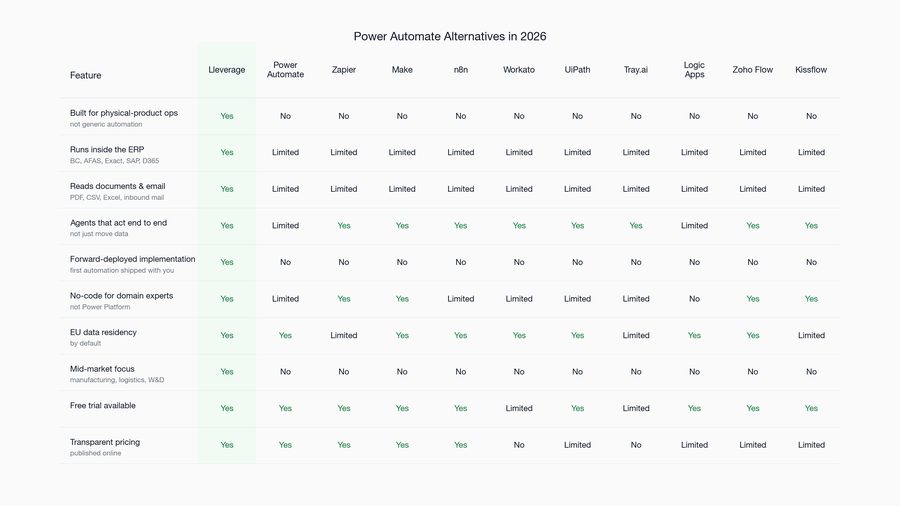
In the UiPath vs Power Automate decision, UiPath fits complex desktop and legacy-system work at enterprise scale, while Power Automate fits Microsoft-standardised teams automating structured, predictable flows at a fraction of the cost. Our view at Lleverage is that most back-office work fits neither, and needs an ERP-native AI agent instead.
Both are rules engines. They execute steps you define, against inputs you can predict, and they hand the work back to a person the moment reality deviates. That is a genuine capability and it is also the ceiling. This comparison covers what each does well, what they cost once volume grows, and the specific kind of work that defeats both. We are usually called in after one of them has been running for a year and the exception queue has quietly become someone's full-time job, which is the vantage point this is written from.
If your bottleneck is documents arriving and records needing to exist in an ERP, start with our definition of the autonomous back office, look at how invoice matching runs when an agent owns it, or book a demo with your own paperwork.
What is the difference between UiPath and Power Automate?
Credit to both before the criticism, because each is very good at the job it was built for. UiPath is specialist robotic process automation for enterprises, and it is still the only sensible answer when software has to drive a legacy desktop application, a Citrix session or a mainframe screen. Power Automate is Microsoft's automation layer inside Microsoft 365, and for structured flows between Microsoft services it is close to unbeatable on price, because you have probably already paid for it.
The difference that matters is where each was born, because architecture outlives marketing. UiPath grew up automating screens that have no API, which is exactly the world of a thirty-year-old ERP on an AS/400. Power Automate grew up connecting Microsoft cloud services to each other and reaches outwards through connectors. Both have since acquired AI and agent vocabulary, and both are sincere about it, but you can still tell what each was built for by watching which jobs it does gracefully and which it does with visible effort.
How do UiPath and Power Automate compare on cost?
The gap is large enough to decide the question on its own for many buyers. Power Automate runs at around $15 per user per month including cloud and desktop flows, or about $100 per flow per month for high-volume service-account flows, and basic flows come bundled with many Microsoft 365 E3 and E5 licences. UiPath's Automation Developer sits near $420 per user per month at 2026 enterprise list, with unattended robots roughly $8,000 to $15,000 per robot per year and attended robots roughly $1,500 to $3,000 per user per year.
| UiPath | Power Automate | |
|---|---|---|
| Built for | Enterprise RPA, legacy and desktop | Microsoft-centric cloud flows |
| Typical cost | ~$420 per developer per month; $8k-$15k per unattended robot per year | ~$15 per user per month; ~$100 per flow per month |
| Included with M365 | No | Basic flows with many E3 and E5 licences |
| Legacy and Citrix work | Strong | Limited |
| Non-Microsoft systems | Broad | Weaker, connector-dependent |
| Unstructured documents | Add-on capability | Limited |
| Who maintains it | RPA developers or a partner | Business users, with IT governance |
| Fails by | Selector breaks when the interface changes | Flow stops and queues for a person |
Read the cost rows carefully, because they scale differently. Power Automate's per-user pricing looks unbeatable until premium connectors and per-flow licensing arrive with volume. UiPath's per-robot pricing penalises exactly the high-volume processes most worth automating: the better the business case, the more robots you need, the more you pay.
When is UiPath the right choice?
Choose UiPath when the work involves applications with no usable interface, when volumes justify per-robot economics, and when you have RPA developers or can hire them. Mainframe screens, Citrix-published applications and legacy ERPs are its home ground, and nothing else in this comparison comes close there. Its governance and orchestration tooling is genuinely enterprise-grade, which sounds like a small point until an auditor asks who approved what.
There is a second, less discussed case: organisations that need a defensible audit story for a regulator. UiPath's orchestration, logging and role separation have been through many enterprise reviews, and that maturity has real value when the automation touches financial reporting.
When is Power Automate the right choice?
Choose Power Automate when your systems are Microsoft, the inputs are structured, and the people who understand the process can build the flow themselves without filing a ticket. Approval routing, Teams notifications, moving records between Dynamics and Excel, scheduled data pulls: this is exactly what it was designed for, and the licence is usually already sitting in your Microsoft agreement.
It is also the correct answer for a large class of small automations that never justify a specialist product. If a flow saves an hour a week and costs nothing incremental to run, the discussion is over. We would not propose an agent for that work, and any vendor who does is selling rather than advising. Our Power Automate alternatives page covers the cases where teams outgrow it.
When neither fits, what is the third option?
The third option is an AI agent that works inside your ERP, which is the category Lleverage builds. It matters because neither rules engine fits when the input is unstructured and the decision needs context, and that is where most back-office work actually lives. Picture the case: a supplier sends an order confirmation as a PDF in their own layout, three lines match the purchase order, two have slipped by three weeks, and somebody has to work out what that does to next month's assembly schedule before replying. There is no selector to click and no predictable field to map. A rules engine can tell you the document arrived.
This is the messy middle, and it is most of the back office. Rules engines handle it by failing into a queue, which means your team supervises the automation instead of doing the work. That is the failure mode we see most often in the operations we are called into: a rules engine that worked beautifully in the pilot, then generated an exception list nobody had budgeted headcount to clear.
What the exception queue actually costs
The number that decides this is rarely on a pricing page. Take a mid-sized wholesaler processing 4,000 supplier invoices a year, where a rules engine clears 70% cleanly. The remaining 1,200 exceptions each take a controller ten minutes to investigate and resolve, which is 200 hours, most of a working month spent on the residue of an automation that was sold as finished.
That residue is stable, too. It does not shrink as the tooling improves, because the exceptions are the cases the rules could never express: the supplier who changed their layout, the price agreed verbally, the part number that means two different things in two systems. Automating 70% of a process and keeping a person for the other 30% is a real gain, and it is also the point at which most back-office automation programmes stop.
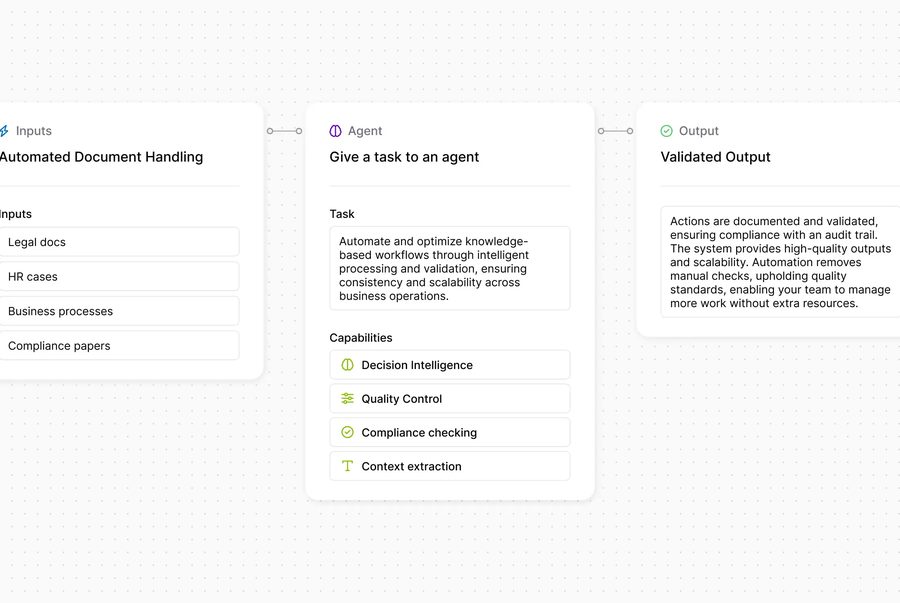
An agent handles that same case differently. It reads the confirmation whatever the layout, matches it line by line against the purchase order in the ERP, checks the schedule impact, drafts the reply to the supplier, and asks a planner for a single approval. In our product demo that whole arc takes 14.6 seconds. That is what Lleverage does and what neither UiPath nor Power Automate is built to do: not a faster script, but work that finishes.
"It will cost more time NOT to use the tool than to use it."
That is Sanne Voesten of Exellyn, an IT infrastructure distributor. Their export desk made the agent mandatory for every new quote within weeks of go-live, after shipment calculations that took more than 20 minutes began completing in seconds.
The measurable pattern from operations running this way: over 90% of incoming orders reaching Business Central without manual input at Topa Bathroom Products, with four people redeployed off order entry, and an agent answering the recurring questions at J. Kisch & Zonen, where 80% of support questions were repeats. The same approach runs invoice matching in finance. Those are not faster scripts. They are processes that no longer need a person in the middle.
So which should you buy?
Buy UiPath if you are automating legacy desktop work at enterprise scale and have the developers to maintain it. Buy Power Automate if you are a Microsoft shop automating structured flows and want the cheapest adequate answer. Buy neither if your problem is documents arriving that require judgement: both will hand that work straight back to your team, and it is the work that costs you FTEs. That case is what Lleverage exists for, running order intake and invoice matching to completion inside Business Central, SAP or Exact.
The test we give buyers costs nothing and settles it quickly: pull the last twenty exceptions your current automation produced and read them. If they are technical failures, a better rules engine will genuinely help, and you should buy one of the two above. If they are judgement calls a person had to make because the input did not match the template, no rules engine will close that gap no matter how much you spend, and order intake or supplier confirmations are where an agent earns its keep instead.
Frequently asked questions
Is Power Automate a replacement for UiPath?
For structured, Microsoft-centric work, frequently yes, at a fraction of the cost. For legacy desktop, Citrix and mainframe automation, no: that is UiPath's core strength and Power Automate's weakest ground. Many enterprises run both, using Power Automate for cloud flows and UiPath where screens must be driven directly.
Which is cheaper, UiPath or Power Automate?
Power Automate, substantially, at roughly $15 per user per month against UiPath's roughly $420 per developer per month and $8,000 to $15,000 per unattended robot per year. The caveat is that per-flow licensing and premium connectors raise Power Automate's real cost at volume, so compare on cost per completed transaction rather than list price.
Can either handle unstructured documents like supplier invoices?
Partially, through add-on document capabilities, and with real limits. Both need reliable structure to act on, so layout variation from suppliers tends to produce exceptions rather than completed work. Purpose-built document agents read the document as a person would and complete the downstream posting, which is a different architecture rather than a better setting.
What is the third option in the UiPath vs Power Automate debate?
An ERP-native AI agent, which is what Lleverage builds. It reads inbound documents, decides within limits your team sets, completes the work inside Business Central, SAP or Exact, and escalates exceptions with an explanation. It fits when documents are messy and decisions carry exceptions. When flows are predictable and structured, buy one of the other two instead.
Test it against your own exceptions
Pick the twenty documents that generated the most manual work last month and see what completes without a person touching them. That test separates a rules engine from an agent faster than any comparison table. Book a demo with those documents.