Copilot Studio builds assistants that answer questions inside Microsoft 365. Lleverage builds agents that complete back-office work inside your ERP. Our view at Lleverage is that this is a difference of kind, not degree: one tells your team what the answer is, the other posts the order, matches the invoice and chases the payment.
That distinction gets lost in evaluations because both are described as AI agents. A Copilot Studio agent that answers "what is the status of order 4500000008?" is genuinely useful. It is a different purchase from a system that reads the supplier's confirmation, spots that two of five lines slipped by three weeks, works out what that does to next month's assembly, and puts a drafted reply in front of a planner. This article sets out where each one fits. We build the second kind, for companies whose back offices run on documents that arrive every day, so that is the experience it draws on.
Lleverage builds the second kind for companies that make, move and sell physical products: agents that run order intake and supplier confirmations inside Business Central, SAP and Exact. If you would rather see it than read about it, book a demo with your own documents, or start with our definition of the autonomous back office.
What is Microsoft Copilot Studio?
Credit first, because it is deserved. Copilot Studio is the fastest way most companies will ever get a working AI assistant in front of their staff. You build it visually, ground it in SharePoint content, and it appears in Teams where people already are: an HR bot that answers policy questions, a support bot that looks up order status. For a category this young, that is a remarkable amount of friction removed.
Microsoft has also been pushing it towards action rather than answers. Computer-use agents reached general availability on 13 May 2026, letting an agent drive an application interface directly, with credentials in Azure Key Vault, Purview audit logging and configurable human review. There is a catch worth knowing before you plan around it: computer use only works on generative orchestration, so agents built on classic orchestration cannot use it at all.
Its pricing is unusually transparent for this category: $0.01 per Copilot Credit, or a capacity pack of 25,000 credits for $200 per month, with a standalone $200 per tenant licence for E3 and E5 organisations that want to build custom agents. If you already run Microsoft 365 Copilot, some agent usage is included.
How does Copilot Studio differ from Power Automate?
They solve different halves of the same sentence. Power Automate moves data between systems on a trigger, using structured inputs and fixed rules. Copilot Studio holds a conversation and retrieves answers. Microsoft-standardised teams often buy both, then discover neither one closes a back-office process end to end.
The confusion is understandable, and it matters commercially, because a team that buys Copilot Studio expecting Power Automate's execution ends up disappointed in the wrong product. Power Automate is around $15 per user per month with cloud and desktop flows, or $100 per flow per month for high-volume service-account flows, and basic flows come bundled with many E3 and E5 licences. Copilot Studio is credit-metered on conversations and agent actions.
Our reading of the two: Power Automate is the right answer for predictable, structured movement between Microsoft systems, and Copilot Studio is the right answer when people need an interface to ask questions of company knowledge. Neither is designed to own the arithmetic of a three-way match.
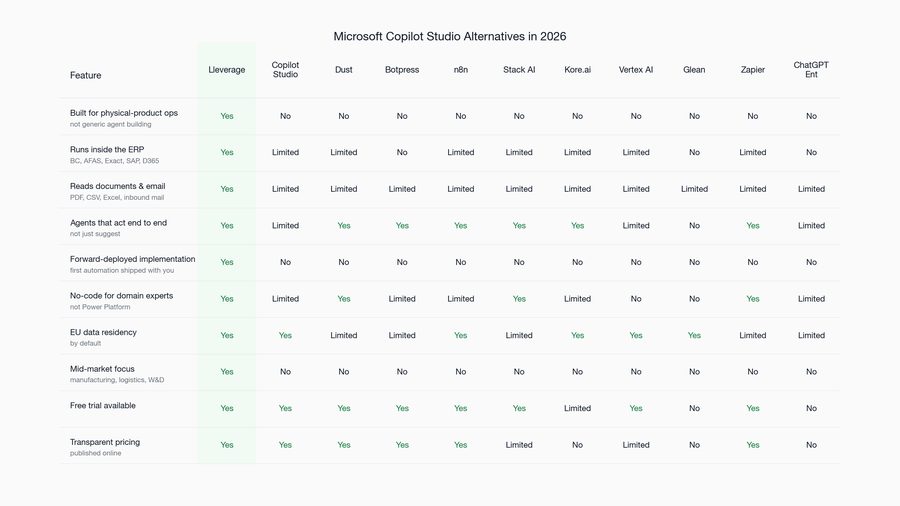
Copilot Studio vs Lleverage: what actually differs?
| Microsoft Copilot Studio | Lleverage | |
|---|---|---|
| Primary job | Answers questions, drafts replies | Completes work end to end |
| Where work lands | Chat surface, Microsoft 365 apps | Inside the ERP as posted records |
| Input it expects | Documents and knowledge sources for retrieval | Inbound orders, confirmations, invoices as they arrive |
| ERP coverage | Microsoft-centric, connectors elsewhere | Business Central, SAP, Exact, Infor, AS/400-era |
| Who builds it | Your team, in Power Platform | Forward-deployed with your team, owned by them after |
| Skills needed | Power Platform capability in-house | Operations knowledge, no development team |
| Pricing model | Copilot Credits, $0.01 each or $200 per 25,000 | One monthly price per agent |
| Best fit | Knowledge questions across the organisation | Order intake, invoice matching, supplier confirmations |
One row decides most evaluations, and it is the second. Ask what the output of the work actually is. If it is a person reading an answer, Copilot Studio is well suited and almost certainly cheaper than anything purpose-built, and we would say so in a sales conversation. If it is a record that has to exist in the ERP, correctly, four thousand times a year, then the assistant has handed the work back to your team at precisely the point where the work lives.
Where does Copilot Studio genuinely win?
Copilot Studio is the better choice when the organisation is standardised on Microsoft, the job is answering questions from existing content, and the value is measured in time-to-answer rather than transactions completed. Internal knowledge assistants, policy lookups and IT self-service are natural fits, and existing licences often make the marginal cost small.
It also wins on reach, and reach is underrated. Putting one assistant in Teams in front of every employee is something no specialist vendor can match, and Purview logging plus Key Vault credential handling keeps the IT governance conversation short. We will say the obvious thing here: for the knowledge-assistant job, buying a specialist product instead of Copilot Studio is usually the wrong call, and any vendor telling you otherwise is selling.
Where does the assistant model run out?
The limit shows up at the moment a decision needs to become a transaction. An assistant can tell a controller that the invoice does not match the purchase order. It does not decide the tolerance was acceptable, post it, and route the exception with a drafted supplier reply.
That gap is measurable in the operations we run. At Topa Bathroom Products, more than 90% of incoming orders now post into Business Central without any manual input, and four people moved off order entry onto after-sales and service planning. In invoice processing, each invoice line is matched to the order and the goods received, and only the lines outside your tolerance reach finance. In our product demo, a supplier confirmation is checked line by line, deviations are flagged with advice and a reply is drafted. None of those numbers describe faster answers. They describe work that finished.
"It's like hiring an extra colleague — but this colleague is very smart, barely gets sick, and has very few emotions to manage."
That is Bryan van Ingen of Topa Bathroom Products, describing the agent that runs his order intake. It is a useful test to apply to any product in this category: would you describe it as a colleague who does the work, or as a very well-informed reference desk?
A worked example: the same invoice, two products
Take one supplier invoice for €14,200 against a purchase order raised three weeks earlier, where the goods receipt shows 48 units delivered against 50 ordered.
Through an assistant, a controller asks what the difference is and gets a clear, correct answer in seconds: two units short, €568 of value, purchase order number attached. The controller then opens the ERP, decides whether the tolerance is acceptable, posts or holds the invoice, and writes to the supplier. The assistant saved the lookup, which is perhaps two minutes of a twelve-minute task.
Through an ERP-native agent, the invoice is captured, matched two- and three-way against the purchase order and goods receipt, found to be outside tolerance, held, and placed on the controller's exception list with the deviation explained and a supplier reply drafted. The controller approves or overrides in one click. The remaining ten minutes are the ones that disappear, and they are the ones repeated four thousand times a year.
Neither product is being misused in that example. They are simply answering different questions: what is the difference, versus what should happen next.
Which should you choose?
Choose Copilot Studio when your people need better answers from company knowledge and you are already standardised on Microsoft. Choose an ERP-native agent when your people are retyping documents into a system of record, and the cost is measured in FTEs rather than minutes.
Most mid-sized manufacturers and wholesalers we meet end up wanting both, and the sequencing is where people go wrong. The knowledge assistant is a quality-of-life improvement that lands in weeks and makes everyone slightly happier. The back-office agent changes the headcount arithmetic of the operation, which is a slower conversation with a bigger number at the end of it. Our position, from building the second kind: if your admin team is the constraint on growth, an assistant will not move that number, however good it gets at answering.
There is also a genuine third case where neither fits. If your process is predictable, structured and entirely within Microsoft systems, Power Automate is cheaper than either and adequate. Reach for agents when documents are messy and decisions have exceptions.
Frequently asked questions
Can Copilot Studio post an order into an ERP?
Only through connectors or a computer-use agent driving an interface, and both put the reliability burden on you. Copilot Studio is architected for conversation and retrieval; posting a validated sales order with correct customer, article, price and tolerance handling is a different problem, and it is the one an ERP-native agent is built for.
Is Copilot Studio cheaper than a purpose-built agent?
Usually yes at the start, and the comparison is not like for like. Copilot Studio runs on Copilot Credits at $0.01 each, or $200 per 25,000 credits per month, and E3 or E5 organisations can add a $200 per tenant licence. Lleverage charges one monthly price per agent. The right comparison is cost per completed transaction, not cost per conversation.
Do we need Power Platform skills to run Copilot Studio?
For anything beyond a basic assistant, yes. Agents built on generative orchestration, connected to line-of-business data, with computer use enabled, need someone fluent in the Power Platform to build and maintain them. That capability requirement is the most common reason mid-market teams stall after a promising pilot.
Can we run both?
Yes, and many of our customers do. The clean division is answers versus transactions: Copilot Studio for questions employees ask, ERP-native agents for the documents that arrive and must be processed. Problems appear when one is bought expecting the other's job.
See what finishing the work looks like
Bring twenty real orders or supplier invoices and watch what completes inside your ERP without a person touching it. That single test separates the two categories in this article faster than any feature comparison. Book a demo with your own documents.